
Five searches are landing on the same fifteen seconds. Fancy Cafe AI names the tool. First Time in a Fancy Cafe AI names the joke, usually with the full caption people saw on their feed. Fancy Cafe AI Video Generator names the file they want at the end. Fancy Cafe AI Trend names the week the format spread. Fancy Cafe TikTok Meme names the platform that pushed it. The clip behind all five is a single locked-off shot in a bare concrete cafe, where somebody sits on a tiny round table as if it were a stool, and then finds out what the table was for.
This is the how-to for making that clip on Fancy Cafe AI, the browser generator at fancycafe.pro. On November 5, 2026 we read the homepage, the pricing page, the FAQ, and the supporting guides on photos, sound, phone use and the meme's origin. We did not buy a render, so every statement below about likeness, motion, render time or a finished mouth is the site's own description rather than a clip we generated and watched. Prices and model names move fast during a trend. If this article and the number on the render button disagree, the button is attached to your account and this article is not. Our editorial policy explains how we treat a vendor's claims when the paid job has not been run.
Quick answer: Upload one clear photo of an adult who has agreed to appear. On Fancy Cafe AI, photo 1 is the person perched on the tiny wall table, and the optional photo 2 is the person who walks in; leave slot 2 empty and a fictional adult plays that part. The output is a roughly 15-second vertical 9:16 MP4, 480p or 720p, with the trend audio or a silent track. A Standard 480p clip is 10 credits, which the $6.99 Single pack covers. There is no free preview, and the site is an independent fan project that says plainly it is not affiliated with TikTok, Instagram, CapCut or the meme's creators.
What Those Five Searches Are Asking For
Start with the words, because they overlap and the products behind them do not.
Fancy Cafe AI is the name of a web app and also the loose name of the format. The hostname matters more than the phrase. Several sites sell a clip in the same concrete room, and the names differ by a single letter — fancycafe.pro, fancycafe.video, fancycafeai.com, fancycafe.app, firsttimeinafancycafe.com. An account on one is not an account on another, and a credit balance does not travel. Read the address bar before you read a price.
First Time in a Fancy Cafe AI is the caption people actually saw. The joke is told from the point of view of someone who has never been to a design-heavy coffee shop and has misread the furniture. The phrase is not describing a luxury cafe tour. It is describing an embarrassment.
Fancy Cafe AI Video Generator describes the output. You leave with an MP4, not with a preset you still have to time in an editor. The site is explicit that the work happens in a phone or desktop browser with no app install and no CapCut template required to build the scene. CapCut can still trim or caption the finished file afterwards. That is a second piece of software, used on a clip that already exists.
Fancy Cafe AI Trend is the social pattern around the skit: one fixed camera, two characters, no dialogue, one punchline. The trend is older than any one website. A generator is a way to enter it from a still photo when you have neither the cafe nor a friend who will film it with you.
Fancy Cafe TikTok Meme is the same thing with the platform named. That matters for two reasons. First, the format's grammar is vertical and short, so a horizontal or thirty-second version is a different product. Second, TikTok is where the label lives. The platform asks creators to mark realistic AI video, and a clip made from your photo is exactly the kind of file that label was written for.
Where the Joke Comes From
The format has a documented birthday, which is unusual for a meme and useful for anyone deciding whether the thing they are being sold is the thing they meant.
Know Your Meme dates the earliest tracked post to TikTok on November 1, 2026, by the account @leehoustonx. That post is set to "oh yeah?" by Steve Lacy and reportedly passed 9.2 million views within two days. The scene it establishes is the scene every generator now rebuilds: a bare concrete room, a low bench along the wall, and small round tables cantilevered off the wall on a single black arm.
That furniture is the whole trick. A wall-mounted cafe table with a slim round top, mounted directly above a low concrete bench, reads at a glance like a stool with a backrest — until somebody sits on the bench and puts a cup on it. Nobody designed the room as a prank. The prank is that a real minimalist design trend can be misread by a person who is trying to look like they belong.
The creator credit is genuinely unsettled, and the sources say so. Know Your Meme still marks the entry as being researched. Other write-ups name the comedian Kevin Winnik (@kevkevkiwi) as the performer in the version most people saw, with copies circulating on November 1 and an Instagram version on November 2 that reportedly collected more than 14.5 million likes in a day. A bookshelf-cafe remake by @stevenwommack appeared the same week. What is not in dispute is the spread pattern: within about seventy-two hours the format had produced filmed remakes, CapCut templates, drawn versions, dog versions, and a wave of AI recasts that put athletes, coaches and other well-memed figures on the table.
One more thing is unsettled, and it is the question people ask most. Is the original real or AI? Know Your Meme files it as AI-generated. Several write-ups describe it as a filmed sketch. A generator site cannot settle that dispute, and this article does not either. What can be said with confidence is narrower and still useful: clips made by a photo generator are always AI-generated, and a caption should say so.
The Four Beats the Clip Has to Hit
A Fancy Cafe AI video is not a prompt. It is an edit that already exists, and the only variable is who is standing in it. The template on fancycafe.pro prints its own timing, and the timing is the product:
| Time | What happens | Why it is funny |
|---|---|---|
| 0–5.5 s | You perch on the tiny round table, feet on the bench, sipping a coffee. | You look completely at ease. |
| 5.5–9 s | A second person walks in, sits on the concrete bench, and puts a cup on the table. | They demonstrate what the furniture is for. |
| 9–11.5 s | You look at their cup, then at the table under you, and freeze. | The realization lands in silence. |
| 11.5–15 s | You climb down, sit on the bench, and act as if nothing happened. | Nobody says a word. |
That table is worth reading twice, because it tells you what to reject. A clip that opens on the second character, or that never shows the climb down, is not a worse version of this meme — it is a different video wearing the same song. The site's own prompt guide makes the same point from the other side: the climb-down at the end is the punchline, and it should stay in even if the clip is shortened.
The four beats also explain why the format travelled so fast. There is no dialogue to translate, no punchline to localize, and no performance to coach. Two people, one room, one misunderstanding. Anyone can be dropped in, which is exactly what made it a template within a day.
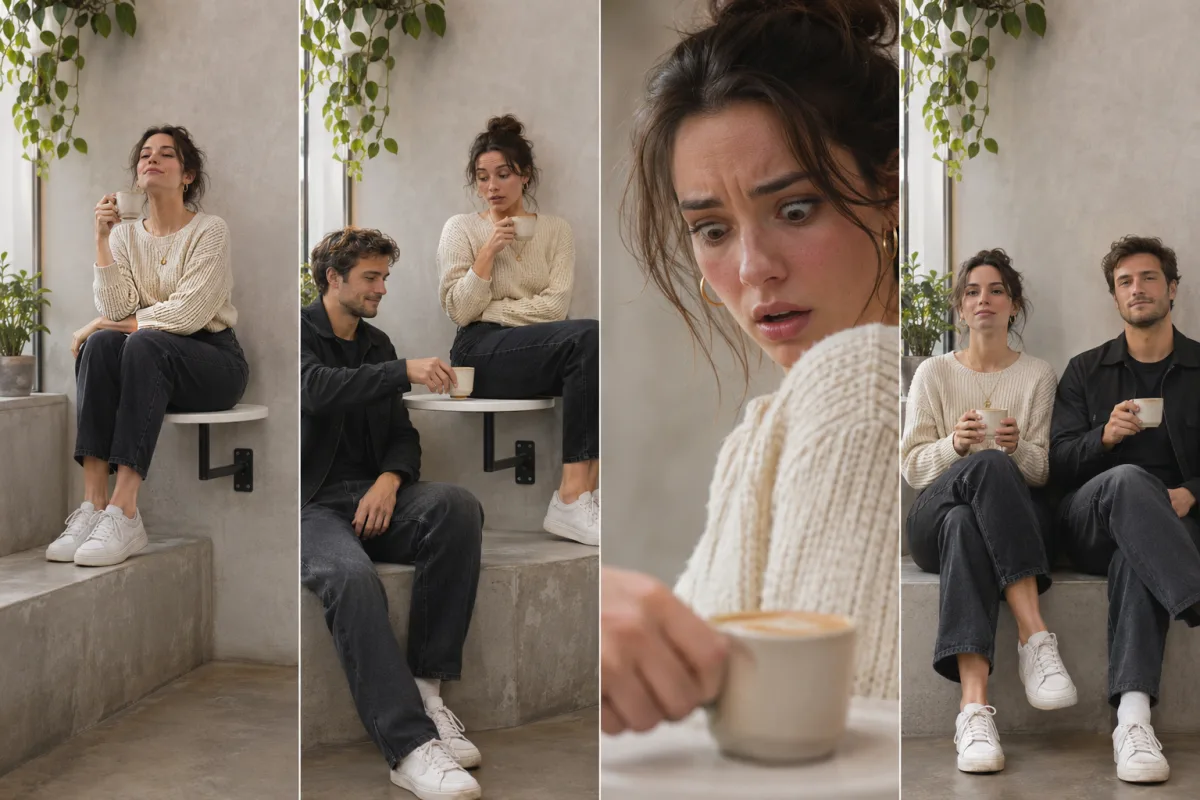
Illustration made for this article. It follows the four-beat order the site prints: the confident perch, the arrival, the freeze, and the quiet climb down. The people are fictional. This is not a screenshot of fancycafe.pro and not a frame from a render we paid for.
What the Generator Actually Returns
Fancy Cafe AI describes a narrow file, and the narrowness is the point. These are the limits printed on the homepage and the FAQ when we read them on November 5, 2026.
- Input. One photo is required, one more is optional. JPG, PNG or WebP, under 10 MB, at least 300 × 300 pixels. One clear face per photo.
- Who plays whom. Photo 1 sits on the tiny table. Photo 2 walks in and sits on the bench. Leave slot 2 empty and a fictional adult — generated, not a stock human — takes that role.
- Output. Roughly 15 seconds, vertical 9:16, MP4. No watermark on paid downloads. Finished clips are kept in My Creations.
- Resolution. 480p or 720p. Standard renders on Seedance 2.0 Fast; Pro renders on Seedance 2.5, the newer model.
- Audio. The trend's sound by default, cut to stay in time with the action. Silent exports the same picture with no audio track.
- Notes. An optional director's note, capped at 500 characters, limited to clothing, and expected to start with "Outfit:". It is not a box for a new scene, a new song or a new joke.
- Account. A free sign-in is required. There is no free preview and no free credit.
Notice what the pipeline is and is not. The site says a silent reference clip of the trend guides timing, camera and movement, and the AI puts the people from your photos into that scene. It is not a face swap pasted onto somebody else's footage. Every output is a newly generated scene, which is why two runs with identical photos will not match exactly, and why the site tells you to watch the whole thing before you post.
That is also where the honest limits live. Faces, hands and furniture can drift during generation. A likeness is never guaranteed. The four beats usually land, but a hand on a cup can gain a finger, and a table arm can bend in a way hardware does not. Read those limits as the price of a fifteen-second clip built by a model rather than shot by a camera.
How to Make the Video
The maker runs in the browser. The decisions that change the result all happen before you press the button, and almost all of them are about the photo.
Decide the joke in one sentence. The homepage's own examples are a useful filter. You, fully committed as the first-timer. You and the friend who always knows the best coffee spots, with that friend on the table. A couple's first date, one of you perched and one of you calm. An office in-joke for a colleague's farewell. The birthday regular who insists on the fancy place every year. If you cannot say in one sentence who is on the table and who walks in, you are not ready to spend a credit. That sentence is the edit.
Pick the photo the camera can actually read. The shot in this skit sits back and shows the whole body, so a sharp source matters more than a dramatic one. Crop to one person, waist-up or head to toe, looking roughly at the camera. Daylight and sharp focus help a lot. Group shots confuse the likeness, because the model has to decide which face in the frame is the subject. Sunglasses, heavy beauty filters, masks and steep profile angles all make the same problem worse.
Put each person in their own file. Two people in one photo is the single most common way to ruin a two-person render. The site's two-photo guide says the same thing: separate files, one face each, because the model has to keep two identities apart across fifteen seconds. Photos can come from different days and different rooms. They do not need to match.
Cast in the order the form uses. Photo 1 is the person on the table. Photo 2 is the person who walks in. Swapping them after a render is a new render, not an edit. If the punchline only works when your friend is the one who got it wrong, your friend is photo 1.
Write a clothing note only if the photo does not already show what you want. The field is capped at 500 characters and limited to clothing. The placeholder on the form is the kind of note it accepts. Asking for a different room, a different song, a skyline or a longer clip is asking for a product this page does not sell.
Choose sound for the room the clip will play in. Template sound keeps the reference audio on the MP4 and times the action to it. Silent strips that track so you can attach the sound inside TikTok, Reels or Shorts. Both are legitimate; they are different workflows. If you plan to add the sound in the app, exporting with it and adding it again gives you a doubled track that nobody will thank you for.
Read the credit number before you confirm. The button shows the total. A Standard 480p clip is 10 credits, which the $6.99 Single pack covers exactly. Standard 720p is 22 credits, which the Single pack does not cover. Pro is 18 or 40 depending on resolution.
Tick the permission box only when it is true. The checkbox asks you to confirm that you have permission from everyone pictured, that everyone is 18 or older, and that nobody pictured is a celebrity or public figure. That last clause is not decorative. Viral versions of this meme did put famous faces on the table, and the site deliberately does not support that route, even for a joke.
Watch all fifteen seconds before you post. Check the climb down, the hands, the cup, and the seam where a face stops looking like the photo. A render that finishes is not automatically a render worth publishing.
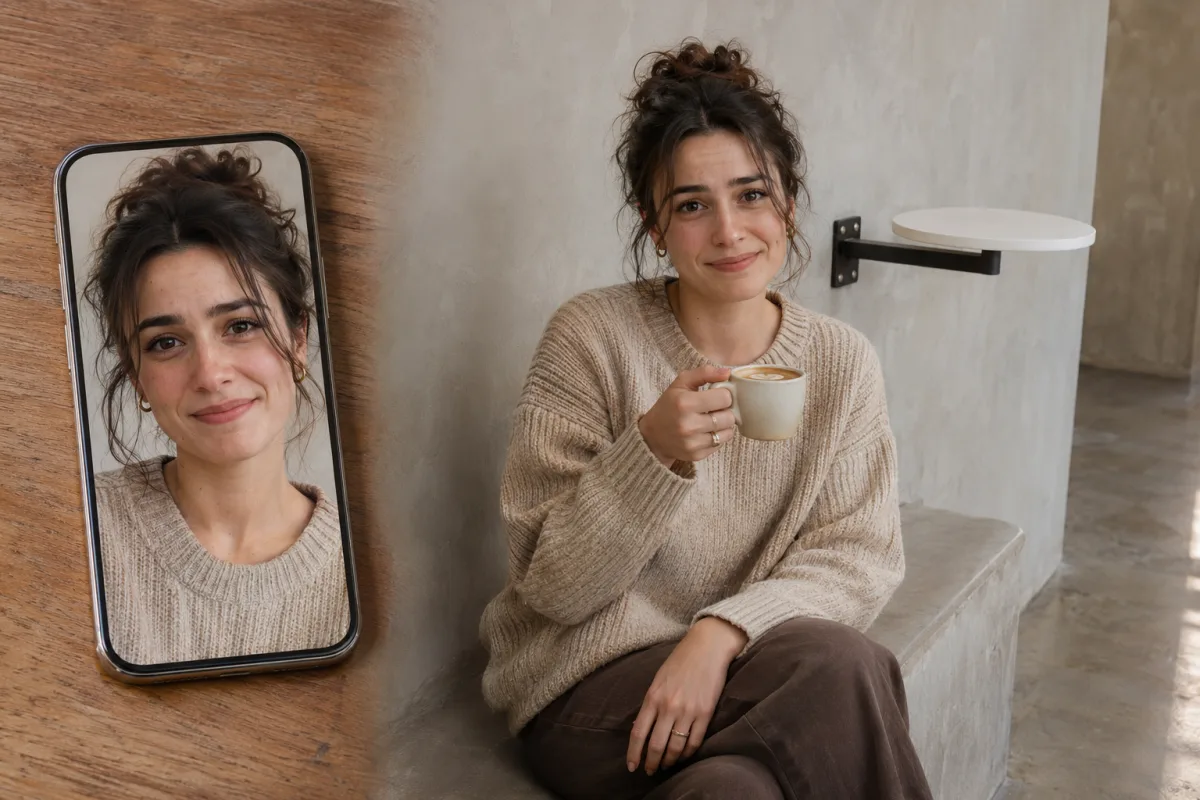
Illustration made for this article. One clear photo is the input the maker asks for; the cafe on the right stands in for the scene that photo is meant to become. The person is fictional, and this is not a screenshot or a customer render.
Which Photo Belongs in Which Slot
People arriving from a prompt-based tool expect a sentence to do the work. Here the photograph is the brief, and the optional sentence only covers clothes. That changes what a good input looks like.
A useful portrait for this template has a boring background and an obvious face. Window light in front of the person, rather than a bright window behind them, fixes more of a dim selfie than any "Outfit:" line. An arm's-length photo taken in a dark room gives the model a slightly wide face and eyes in shadow, and then asks it to invent the jaw for fifteen seconds of turning and climbing.
Match the file to the shot that will use it. The person on the table is seen full-body, seated with their feet on a bench, so a crop that starts at the eyebrows throws away the hairline and the outline the wider frame needs. Waist-up works; a head-only crop is a gamble. The person who walks in is seen standing and then sitting, so a frame that includes shoulders and the top of the outfit gives the model less to invent. Nobody has to be holding a coffee cup in the source photo — the cup comes from the scene, not from your upload.
The temptation is to upload one nice photo of the two of you together, because that is the photo you actually have. Resist it. Two tight portraits taken on different days at different kitchens will beat one flattering group shot every time, because the model's job is to keep two people apart, and a group photo is a file where two identities are already touching.
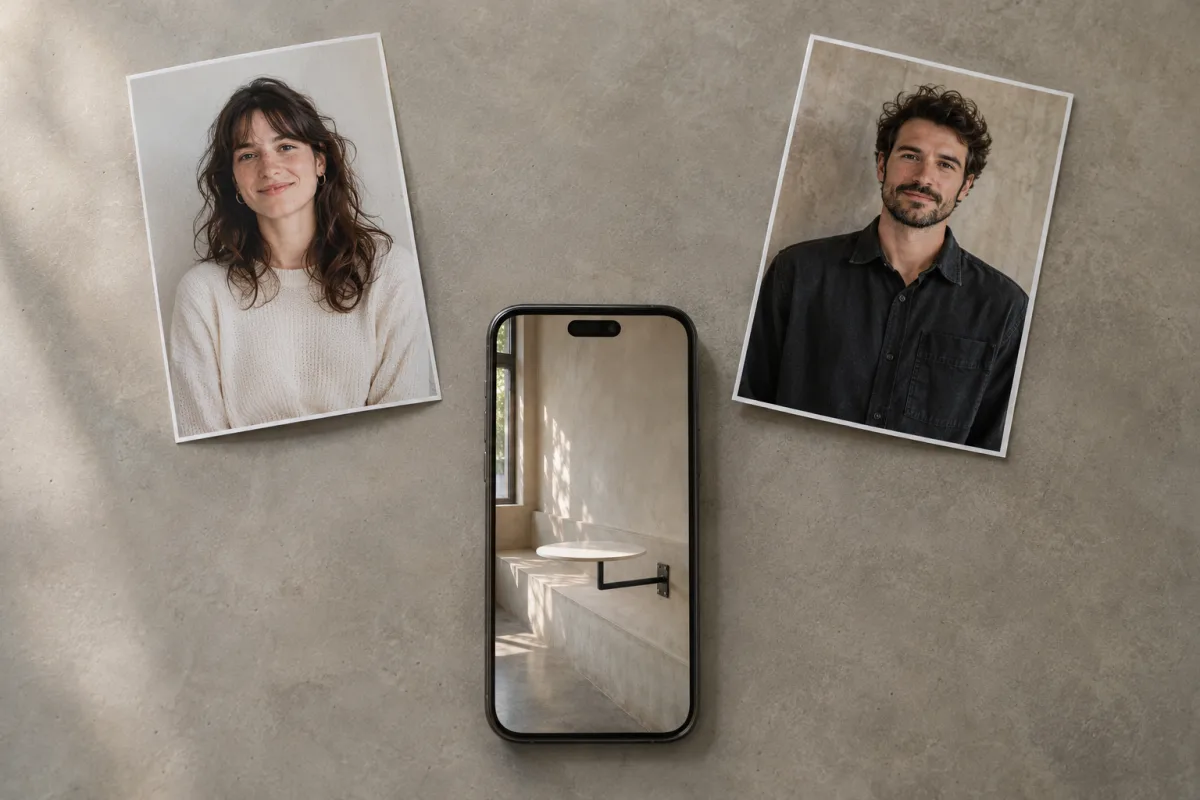
Illustration made for this article. Two separate files, one face each, are the input the two-photo workflow expects. The cafe on the phone stands in for the scene those photos become. The people are fictional, and no interface is shown, because a fake screenshot would invent buttons the product does not have.
Why a General Studio Will Not Finish This Job
Some of the traffic around this meme lands on a general image-to-video studio instead of a template. That is a reasonable place to start and usually the wrong place to finish, and it is worth being concrete about why.
A general studio takes a prompt and a start frame, and it will happily accept "a person sitting on a tiny table in a fancy cafe." What comes back is often a nice-looking cafe. The room fills with marble, latte art and golden-hour light, because the words "fancy cafe" describe an aesthetic to a language model, and aesthetics are what a general model is best at. The joke, however, needs the opposite: a plain concrete room where a table looks exactly like a stool, one locked-off camera, and a specific order of events ending in a climb down. None of that is in the phrase.
The site's own guide on ChatGPT and this trend makes the same observation from recorded answers: ask for a "fancy cafe AI video" and you tend to get a luxury lifestyle cafe animation, or an AI still of you in a cafe. Add "POV" and "sit on the tiny table" and answers improve, because that wording matches pages about the trend rather than pages about coffee. That is a useful lesson about how these models read queries, and it is also why a template exists: the template already contains the wording.
Seedance 3, the studio publishing this article, is in the same broad category as those general tools. On our homepage you can run text-to-video and image-to-video jobs through Seedance 1.5 Pro, Veo 3.1 and Sora 2 while Seedance 3.0 is on the way. Naming a Seedance model does not turn our open workspace into a fixed four-beat template, and it does not turn the template into an open prompt. If you want to direct an original scene, use a studio and write the scene. If you want this meme, use the maker that already contains the four beats and the two cast slots.
The practical cost of getting this wrong is measured in retries. A general model will usually need several paid attempts before the cut lands in the right order, and a fixed template spends that money once. A chat window has a different gap: you can ask a chatbot what the meme is, but you cannot see inside the transcript which photo landed on the table, what the credit quote was, or whether Silent was selected. CapCut can hold a soundtrack and a caption. It cannot put your friend into the room.
What the Credits Buy
The pricing page, as shown on November 5, 2026, prices every clip as a render. Only starting a render spends credits; replaying or downloading a saved clip costs nothing. A render that errors out or is stopped by a safety check returns its credits automatically, without a support ticket.
One-time packs, with the site's own approximate counts at 480p:
| Pack | Price | Credits | What the page says it covers |
|---|---|---|---|
| Single | $6.99 once | 10 | One Standard 480p clip |
| Trio | $14.99 once | 30 | Three Standard 480p clips, or one Standard 720p clip with credits left over |
| Duo | $24.99 once | 55 | Five Standard 480p clips, with 5 credits left over |
| Crew | $99 once | 350 | About 35 Standard 480p clips |
| Studio | $199 once | 900 | About 90 Standard 480p clips |
Monthly plans on the same date:
| Plan | Price | Credits each month | About how many 480p clips |
|---|---|---|---|
| Basic | $29.90 | 70 | 7 |
| Pro | $49.90 | 200 | 20 |
| Studio | $99.90 | 600 | 60 |
The per-clip table underneath those packs is the one to memorize, because a pack's "about N clips" line assumes the cheapest Standard 480p render:
| Template and model | 480p | 720p |
|---|---|---|
| Standard · Seedance 2.0 Fast · 15 s | 10 credits | 22 credits |
| Pro · Seedance 2.5 · 15 s | 18 credits | 40 credits |
Do the arithmetic before you buy the small pack. Ten credits is one Standard 480p clip, and that pack does not pay for 720p or for Pro. Twenty-two credits is one Standard 720p render. Eighteen credits is one Pro 480p render, which fits inside the 30-credit Trio with credits left over. Forty credits is one Pro 720p render, which the 55-credit Duo covers with room for a retake. A second attempt is another row on that table, not a free redo.
Pack credits stay in your balance until you spend them, and the page says a pack does not renew. Monthly plan credits end with their 30-day period. A yearly plan, if you choose one, loads the full allowance at once and it lasts until the plan year ends. Renewal is switched off under Settings, then Billing, and access continues through the period you already paid for. Card numbers are entered with an outside payment provider, so they are not stored on the site's own systems.
A failed render returns a credit, not cash. Cash refunds are a separate question with a narrower window. The refund policy asks for an email within 7 days of the charge, requires that you have not made substantial use of paid features, and says one-time credit packs are generally not refundable once credits have been spent. That policy, not this paragraph, is the binding document. Billing questions go to support@fancycafe.pro from the account address, with the payment reference.
Sound, Captions, and the Post
Audio is the part neighbouring sites disagree about, so keep this one narrow. By default the clip keeps the sound of the reference video, timed to the action. Viral versions of this meme use "oh yeah?" by Steve Lacy, and the site states plainly that it does not grant music rights. Silent exports a picture you can rebuild against a sound the posting app already offers.
Those are different legal postures and the same practical warning. Adding a platform sound does not make the recording yours, and it does not turn your render into an official post by anyone. If you export with the template sound, listen to all fifteen seconds with the picture. Mouth movement can miss, and a clip that looks right and sounds wrong is still the clip people will hear.
We cannot tell you that every platform will accept that soundtrack, or that a commercial post is cleared because a toggle said template sound. The site's own terms, not this article, govern that. What the site does say, and what is worth repeating: label the clip as AI where the platform asks, and consider labelling it even where it does not, because the scene is a real design trend and a viewer could otherwise decide a real cafe and real people were involved.
A vertical MP4 with no watermark is easy to drop into TikTok, Reels or Shorts. Easy is not the same as finished. Play it on a phone, once with sound and once without, at the size it will actually appear. Look for a hand on the cup that gains a finger, a table arm that bends, a face in the wide shot that drifts away from the portrait, or a climb down that reads as a slide. If the assignment is wrong, do not caption it as if it were right. Render again with a cleaner photo, or do not post.
The caption is doing real work in this format, because the joke has no dialogue. "POV: Your first time in a fancy cafe" is not a description of the video; it is the frame that tells a viewer what they are watching. A caption that instead claims a real cafe visit, a real friend, or a brand collaboration is the one thing a fifteen-second AI clip cannot survive.
Who Should Make One
The generator fits a small group that wants this one clip and does not want to build it. Two friends who will each send a portrait. A couple who can agree on who gets embarrassed. Coworkers who have agreed on where the finished clip gets posted, before it exists. The friend who insists on the fancy place every birthday. Someone who wants one 480p take of a single face across both roles and understands that the person on the table and the person walking in will then be the same person, which is a different joke and a valid one.
It fits poorly if you need a filmed sketch, a luxury cafe tour, a coffee-pour commercial, a full scene with dialogue, a horizontal edit, a celebrity, a minor, a free test render, or a CapCut template you can layer by hand. It also fits poorly if you want to spend an afternoon learning a video model, because this product's whole claim is that there is nothing to learn and almost nothing to adjust.
The naming will stay crowded. Fancy Cafe AI, First Time in a Fancy Cafe AI, Fancy Cafe AI Video Generator, Fancy Cafe AI Trend and Fancy Cafe TikTok Meme will keep pointing at a mixture of the November 1 clip, the filmed remakes, a dozen look-alike domains and a growing pile of AI recasts. The way through is short. Open the page, read the hostname, check whether the form asks for one photo or two, read the credit number on the button, and decide whether a fifteen-second imagined cafe with your own face in it is the thing you meant to make. When it is, the maker at fancycafe.pro is built to do that one thing, with the cast slots, the sound toggle and the pricing stated above — and with no claim on the clip that made the joke possible.