
Most AI image tools now promise the same thing: type a sentence, get a picture. That promise has become so common that it no longer tells you much. The real differences show up later, when you need a product photo that still looks like your product, a YouTube thumbnail whose headline is spelled correctly, or the same character in the tenth image as in the first.
This guide looks at Banana Pro AI, a browser-based studio that bundles an AI photo editor, a text-to-image generator and a long list of task-specific tools under one credit balance. Instead of a feature list, we have organized it around five jobs people actually search for: editing photos online, generating images from text, making product photography, designing YouTube thumbnails and keeping a character consistent. For each one, we explain how the workflow works, what it costs, where AI still struggles, and how to get a usable result faster.
Quick answer: Banana Pro AI is a credit-based AI image studio. It combines prompt-based photo editing, text-to-image generation with several models (including Nano Banana, GPT Image and Seedream), and dedicated tools for product photography, YouTube thumbnails and character generation. Most image tools cost 10 credits at 1K and 35 credits at 2K or 4K; the thumbnail maker costs 20 credits per batch. Its strongest point is that each task has its own guided workflow; its main limit is the same one every generative tool has: text, logos and fine product details still need a human check.
A note on sources: features, limits and prices below were checked on bananaproai.app on October 20, 2026 and can change. We are a video team, not Banana Pro AI, and our editorial policy explains how we treat vendor claims. Where the site's own pages disagree with each other, we say so.
What Banana Pro AI Is, and What It Is Not
Banana Pro AI presents itself on its homepage as a "Free AI Photo Editor Online" powered by a Nano Banana 2 creative engine. In practice, it is closer to a model aggregator with a large set of purpose-built tools on top.
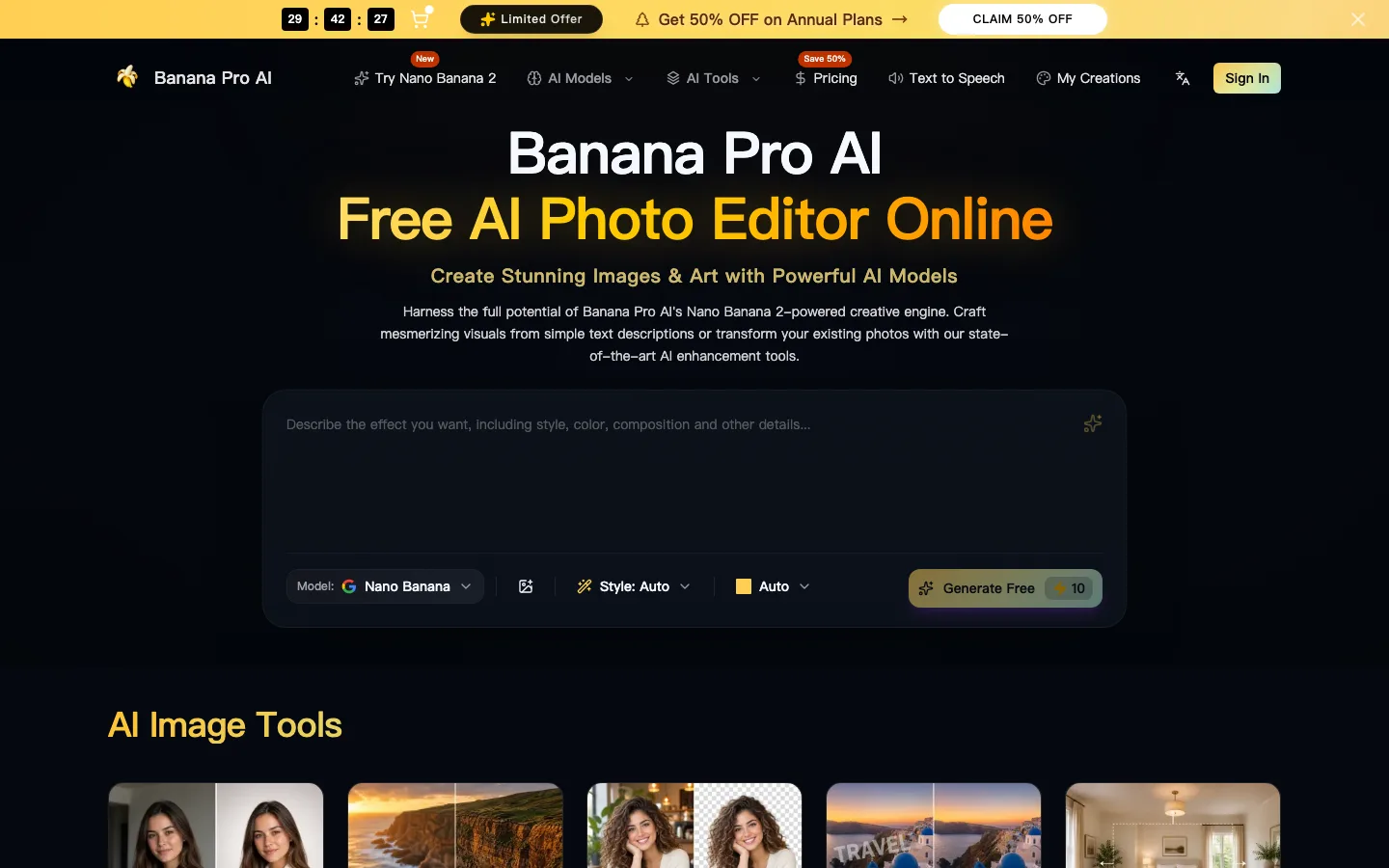
Screenshot of the bananaproai.app homepage, taken October 20, 2026. The prompt box, model selector, style and aspect controls sit above the fold, and the Generate button shows its credit cost before you click.
A few things are worth knowing before you start:
- Several models, one balance. The model menu lists Nano Banana 3, GPT Image 2.5, GPT Image 2, Seedream 4.5 and Flux 2 for images, plus video models such as Veo 3.1, Sora 2, Seedance and Wan 2.6. You spend the same credits across all of them.
- Many narrow tools. The tools menu links to more than one hundred single-purpose pages, from background removal and upscaling to passport photos, mockups, logo makers and thumbnail makers. Each is essentially a pre-built prompt and interface around one of the underlying models.
- Credits, not unlimited use. "Free" on the homepage means you can sign up and try it. Generation is metered. New accounts get a small starting balance (the thumbnail maker page says 15 credits), and the paid plans are where regular use happens.
- It is not a layer editor. There are no brushes, masks or layers in the main editor. Every edit produces a new generated image. That matters for designers who expect Photoshop-style control.
That last point shapes everything else. Banana Pro AI is at its best when you can describe the change you want in words and accept that the model will redraw the image to make it. It is weaker when you need a pixel-exact change in one small region.
Keyword 1: AI Photo Editor Online
The phrase "AI photo editor online" covers two very different expectations. Some people want one-click fixes: remove a background, sharpen a blurry face, erase a tourist. Others want to rewrite a photo with a sentence: put this sofa in a Scandinavian living room, turn this daytime street into a rainy night.
Banana Pro AI handles the first group with dedicated tools, such as the background remover, object remover, photo enhancer, unblur and photo restoration pages. The second group goes through the AI image editor, which is where the platform is most interesting.
How the prompt-based editor works
The editor takes one required source image and up to 15 optional reference images. References are ordered, and you tell the model what each one is for: lighting, material, color or style. The page recommends a four-part instruction:
- One clear change. "Replace the background with a sunlit concrete loft." Not five changes at once.
- What must stay. "Keep the chair's shape, wood grain and leg angle exactly as in the photo."
- The finish. "Soft natural light from the left, realistic shadows, slight film grain."
- Where it will be used. "For a 4:5 Instagram post."
This structure is not just a nice tip. Generative editors redraw the whole frame, so anything you do not explicitly protect is up for reinterpretation. Naming the details to preserve is the single biggest quality lever you have.
Specs and limits worth knowing
- Inputs: JPG, PNG or WebP, up to 20 MB per image.
- Resolution: 1K, 2K or 4K output.
- Aspect ratios: Sixteen options from 21:9 to 9:21, including 1:1, 4:5, 16:9 and 9:16. A few unusual ratios (5:4, 4:5, 3:1, 1:3 and 9:21) are disabled at 2K and 4K.
- Cost: 10 credits at 1K, 35 credits at 2K or 4K.
- Model: The editor page names GPT Image 2 as the engine.
The page is unusually candid about the limits. It says exact pixel-local changes cannot be promised and points users who need to repaint a precise region to a separate generative fill tool. That honesty is useful: if you need to swap one word on a packaging label without touching anything else, a classic editor or a mask-based fill will be more reliable than any whole-image AI rewrite.
When an online AI photo editor is the right tool
Use a prompt-based AI photo editor when the change is easier to describe than to do by hand: a new background, new lighting, a different season, a style shift, an added prop. Stick with traditional tools for typography, exact color matching to a brand swatch, and anything a client will inspect at 100 percent zoom.
Keyword 2: AI Image Generator From Text
Text-to-image is the default mode on the homepage. You write a description, pick a model, style and aspect ratio, and generate. The interesting part is the model choice, because the models are not interchangeable.
From our own experience with these model families, and from how Banana Pro AI positions them:
| Model family | Where it tends to shine | Where to be careful |
|---|---|---|
| Nano Banana (2 / 3) | Fast iterations, reference-guided edits, keeping a subject recognizable | Very long in-image text can still drift |
| GPT Image (2 / 2.5) | Following complex instructions, layouts, signage and readable text | Can look "too clean" for gritty photographic styles |
| Seedream 4.5 | Polished, high-detail photographic and commercial looks | Strong default aesthetic that can override your style |
| Flux 2 | Crisp detail and a wide range of art styles | Benefits from more precise prompting |
The site's Nano Banana 3 model page highlights clean in-image typography, multi-image guidance for identity and style, and 1K, 2K and 4K generation controls. Treat these as vendor claims and test them on your own prompts, but the general direction matches what the newest image models have improved most: text rendering and reference following.
Writing prompts that work across models
A text-to-image prompt that travels well between models usually has five parts:
- Subject: who or what, with concrete details ("a ceramic pour-over coffee dripper, matte sage green").
- Setting: where it is ("on a pale oak counter by a window").
- Light: direction and quality ("low morning sun from the right, long soft shadows").
- Camera: framing and lens feel ("three-quarter view, 50mm, shallow depth of field").
- Use: the output format ("vertical 4:5 for a product carousel, empty space at the top for text").
If you only change one thing between attempts, you learn what each word does. If you rewrite the whole prompt every time, you are rolling dice. That discipline also saves credits, which matters more than people expect once you start working at 2K.
What "free" really means here
The homepage button says "Generate Free" and shows a cost of 10 credits. That is the honest version of free: the sign-up balance lets you test the generator, but sustained text-to-image work runs on a plan. We cover what the plans actually buy you in the pricing section below.
Keyword 3: AI Product Photography
Product photography is where generative AI has the most obvious commercial payoff and the most obvious risk. A studio shoot for a small catalog can take days and a real budget. An AI scene takes minutes. But a product image that does not match the real product leads to returns, complaints and, on some marketplaces, listing problems.
The AI product photography tool is built around that tension. You upload one clean product photo, which the page describes as the "product evidence", and then direct only the scene around it.
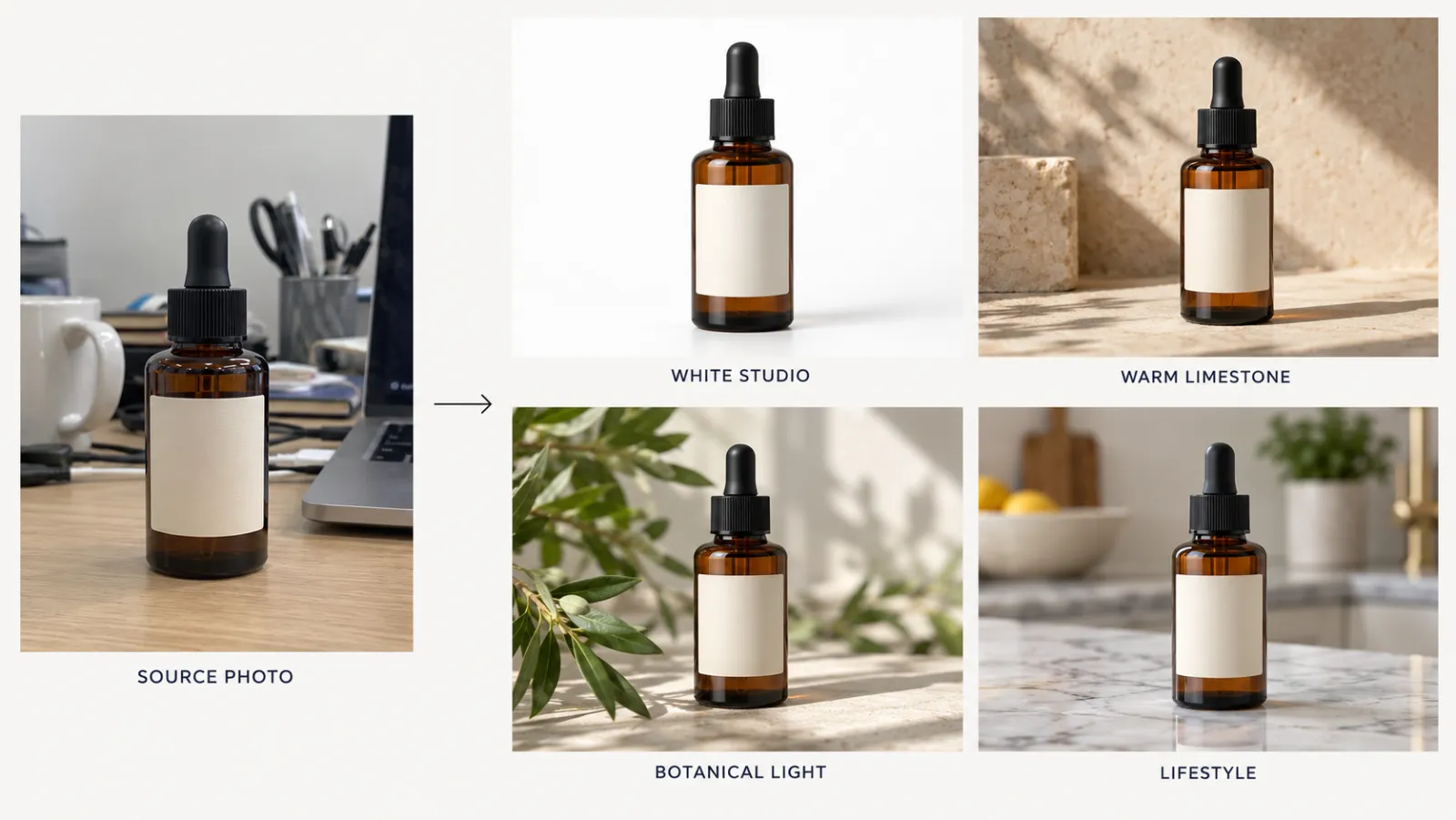
Illustration created for this article with an AI image model: one ordinary desk snapshot of a fictional serum bottle and four scene directions similar to Banana Pro AI's starters. The bottle shape, glass color and label area stay the same; only the surface, light and setting change.
The workflow
- Upload one product image. A sharp, evenly lit, unobstructed photo works best. JPG, PNG and WebP are accepted.
- Choose a scene. Four quick starters cover most needs: White studio, Warm limestone, Botanical light and Kitchen counter. You can also write your own scene, naming the surface, setting, light direction, mood, framing and the product details that must not change.
- Pick a format and resolution. Auto, square, portrait or landscape, at 1K, 2K or 4K.
- Generate and compare against the source. The tool encourages you to put the result next to the original before downloading.
Costs follow the same scale as the editor: 10 credits at 1K and 35 credits at 2K or 4K.
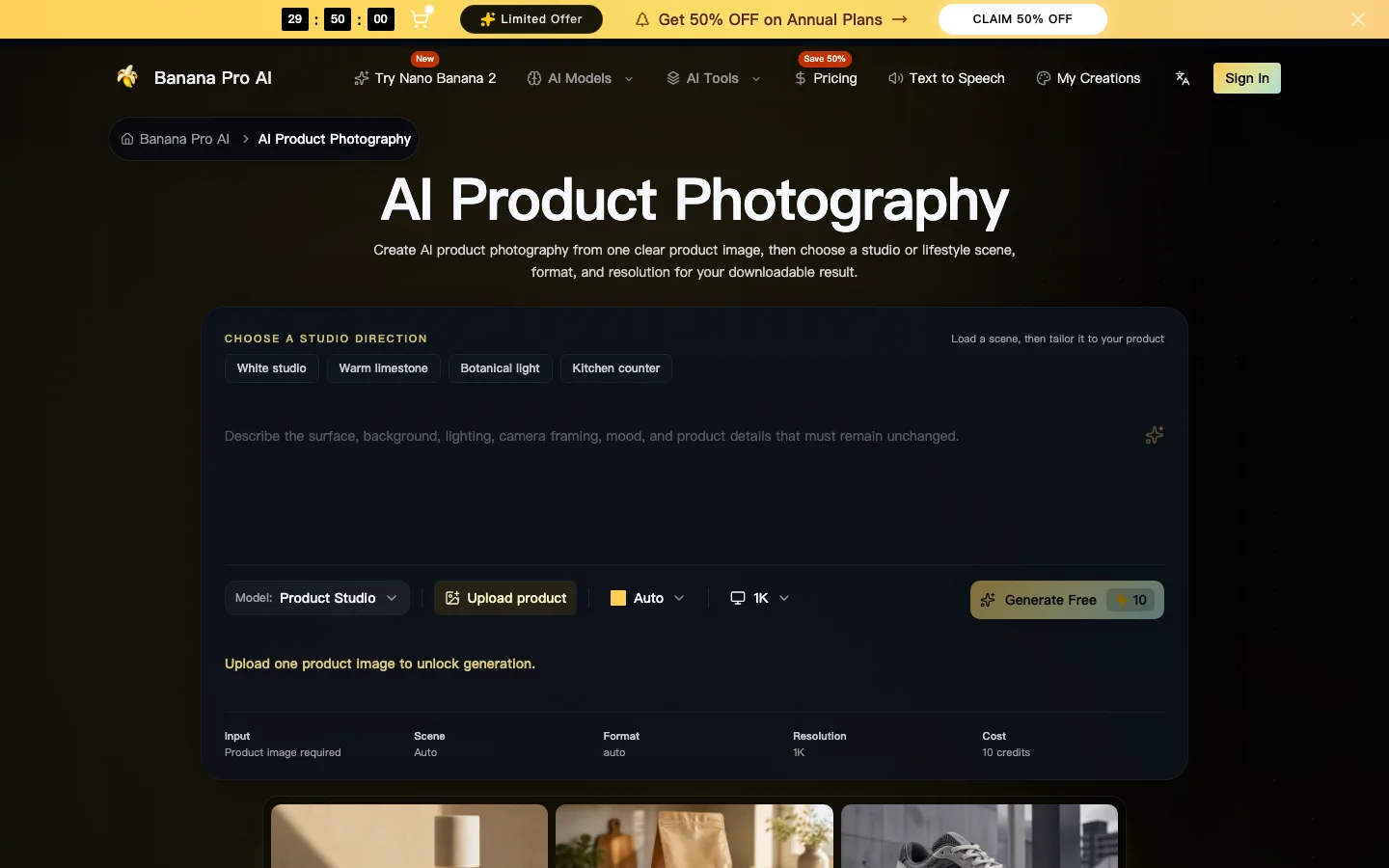
Screenshot of the bananaproai.app AI Product Photography page, taken October 20, 2026, showing the four studio starters, the Upload product button and the 10-credit cost at 1K.
What it does well, and what to check
The scene-first approach suits the most common e-commerce needs: a clean white catalog shot, a few lifestyle images for the product page and social posts, and seasonal variations without a reshoot. Because the product photo is the anchor, shape and color usually carry over well.
The page itself lists what can still go wrong, and it is a good checklist:
- Label text and logos can be redrawn, misspelled or simplified.
- Geometry such as bottle shoulders, cap threads or shoe stitching can shift slightly.
- Colors, reflections and fine edges may change under new lighting.
Our advice is simple. Use AI product photography for lifestyle and campaign images, where a viewer is looking at the mood, not reading the ingredients. For the main listing image on a marketplace, which usually needs a pure white background and an accurate, unaltered product, either use the White studio scene and verify every detail against the real item, or keep a real photo. Most marketplaces, Amazon included, expect the main image to show the actual product as sold, and an AI image that "improves" the product can work against you.
Two more limits from the tool page: it accepts one product image per generation, so there is no batch mode for a whole catalog, and there is no brand-kit locking. If you sell fifty SKUs, plan your prompts as a template and reuse them deliberately.
Keyword 4: AI YouTube Thumbnail Maker
Thumbnails are a different problem from product shots. They are small, they compete with a wall of other thumbnails, and they live or die on a single glance on a phone. A good AI YouTube thumbnail maker should help you produce several distinct options quickly, and then help you judge them at the size people actually see them.
The AI thumbnail maker is one of the more thoughtfully designed tools on the site, mainly because it builds that review step into the interface.
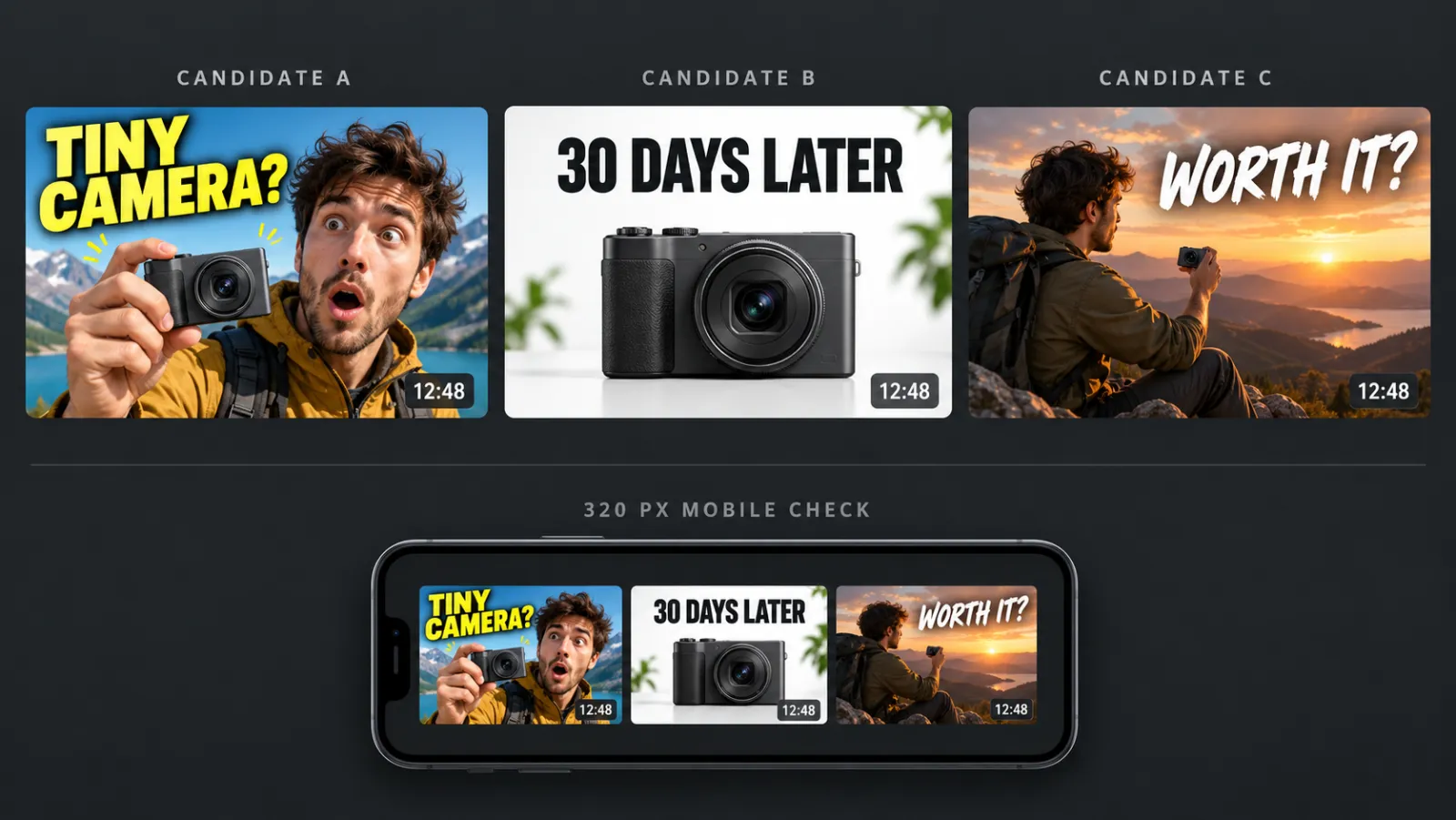
Illustration created for this article with an AI image model: three thumbnail directions for one fictional video, plus the same three shrunk to phone-feed size. The person is fictional. At small sizes, short headlines and a single clear subject survive best.
How it works
You fill in four inputs:
- Video topic (up to 400 characters): what the video is really about and what it promises.
- Headline (optional, up to 60 characters): the page suggests four or five words.
- Visual style: Bold contrast, Clean minimal, Cinematic, Gaming neon, Documentary or Product review.
- References (optional, up to 3 images, 20 MB each): your face, your product or a palette, when identity matters.
Then you choose 1, 2 or 4 candidates. A batch costs 20 credits, reserved once for the whole batch and returned automatically if the task fails. Output is 16:9, generated at 2K. The review stage shows each candidate large with a safe-zone overlay, and again at 320 px wide to simulate a mobile feed.
One honest footnote: new accounts receive 15 credits, which is less than one 20-credit batch. If thumbnails are the reason you are signing up, budget for a plan or a top-up.
Thumbnail rules that still apply with AI
AI makes options cheap, but it does not change what makes a thumbnail work. A few principles that hold across every tool:
- Three elements, maximum. A face, an object and a few words. Anything more turns to noise at phone size.
- Short headlines. Two to five words, large, with strong contrast. Check the spelling yourself; the tool page openly warns that image models can misspell or reshape letters, and recommends finishing exact typography in a regular editor.
- Keep the bottom-right clear. YouTube overlays the video duration there.
- Upload at least 1280 x 720. YouTube's custom thumbnail guidelines ask for a 16:9 image at 1280 x 720 with a minimum width of 640 pixels and a file size under 2 MB. A 2K render downscaled and compressed fits comfortably.
- Match the promise of the video. A thumbnail that over-promises gets the click and loses the viewer.
That last point is not just ethics. YouTube's own Test & compare feature lets you upload up to three thumbnails for one video and picks a winner by watch time share, not click-through rate alone. That makes the thumbnail maker's 2- and 4-candidate batches a natural fit: generate distinct directions, pick the best three after the 320 px check, and let real viewers decide.
Keyword 5: Consistent Character AI Generator
Character consistency is the hardest problem on this list, and the one where marketing claims deserve the most skepticism. Image models do not remember previous outputs. Every generation starts fresh, so the same written description produces a slightly different face each time. For a comic, a children's book, a game or a brand mascot, that drift is a dealbreaker.
Today's tools solve it mostly through reference conditioning: you give the model one or more images of the character, and it uses them as a visual anchor alongside your text. Banana Pro AI's homepage claims multi-reference generation that can track up to five people in one image, and the AI character generator accepts either a prompt alone or up to 16 reference images.
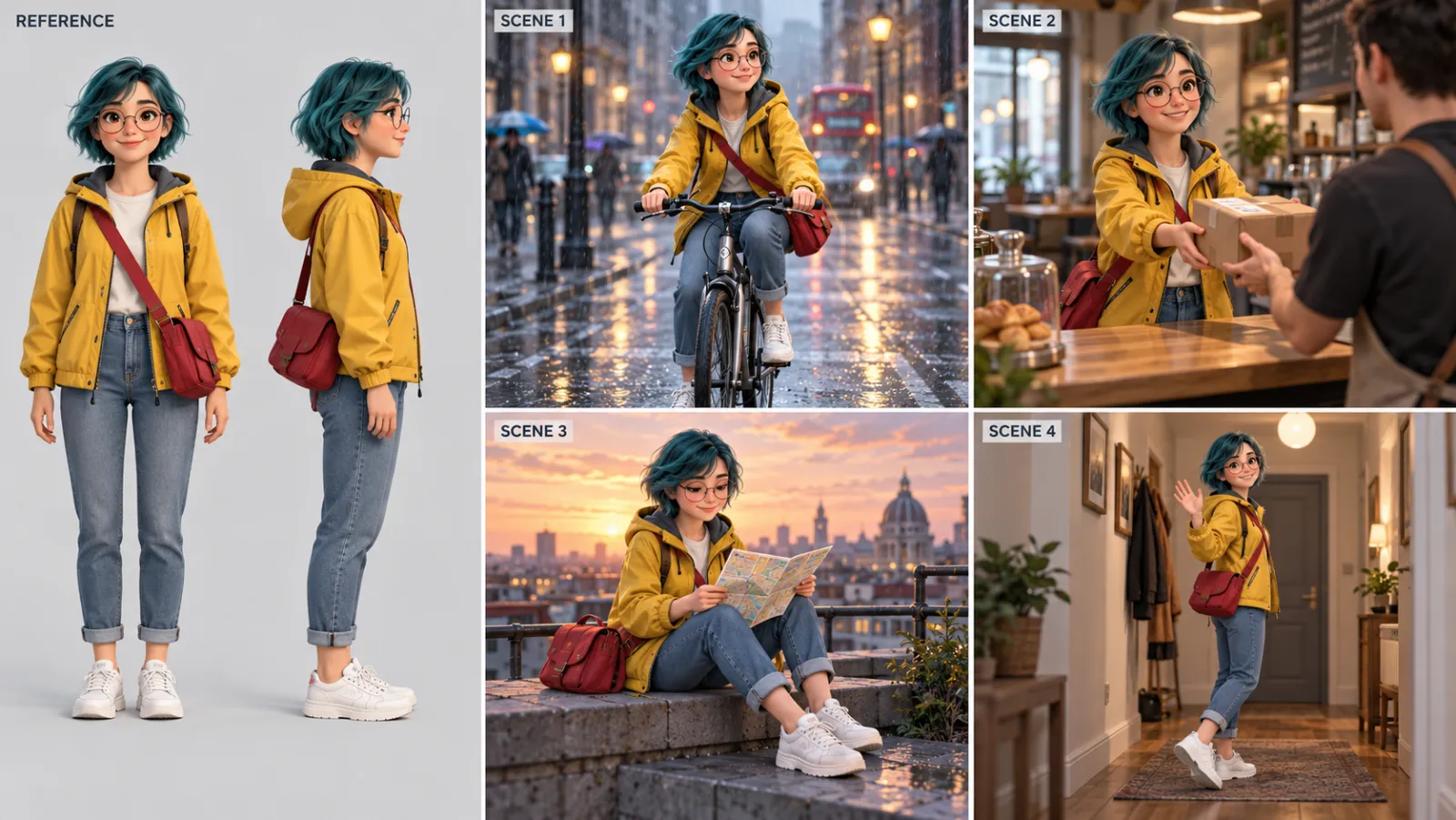
Illustration created for this article with an AI image model: a front and side reference for one fictional mascot, then four scenes that reuse those references. Hair, glasses, jacket and bag stay fixed while action, setting and light change.
Credit where it is due: the character generator page does not overpromise. It says plainly that the workflow does not guarantee an identical face, body, costume or accessories across poses and scenes, and that a multi-view sheet is a generated interpretation, not a trained identity or a 3D model. That is the truth for every reference-based tool on the market right now.
A workflow that actually keeps characters consistent
The site's recommended process matches what we have found works best with any consistent character AI generator:
- Write an identity block once, and never edit it. Age range, face and hair cues, clothing, color palette and one or two signature props. Copy it into every prompt word for word.
- Make a clean reference first. Generate a simple front view and side view on a plain background. One clear subject, even light, face fully visible. Busy group scenes make weak anchors.
- Change one variable at a time. Keep identity, wardrobe and props fixed. Change only the action, camera angle, setting or mood in each new image.
- Promote your best output. When an image nails the character, add it to your references for the next generation. Your reference set gets stronger as the project goes on.
- Simplify when drift appears. If the face starts changing, reduce the scene complexity: fewer people, simpler background, closer framing. Then build back up.
Signature details help more than you would expect. A distinctive hair color, a pair of round glasses or a bright jacket gives the model something easy to hold on to, and gives the reader something to recognize even when the face shifts slightly. That is the same trick cartoonists have always used.
Characters generated at 1K cost 10 credits, at 2K or 4K 35 credits. For a long project, it makes sense to explore poses at 1K and only render final frames at 2K.
One thing to watch on this platform: the reference limit depends on which tool you open. The homepage mentions up to 14 references, the editor up to 15 and the character generator up to 16. None of these numbers is a problem in practice, because a handful of well-chosen references beats a large pile of mixed ones, but it is a sign that each tool page has its own configuration.
Rights and safety
Only use reference photos you own or have permission to use. The character page specifically asks users not to upload celebrities, private individuals, client assets, logos or copyrighted characters without consent or a license. If you are building a mascot for a business, start from an original design rather than a lookalike of an existing character.
Pricing: What the Credits Actually Buy
Banana Pro AI sells annual, monthly and one-time options. On October 20, 2026, the annual plans were advertised at a 50 percent discount:
| Plan | Annual price (per month) | Credits per year | Credits per month | Images per month (as listed) |
|---|---|---|---|---|
| Basic | $4.90 | 6,000 | 500 | Up to 50 |
| Professional | $9.90 | 24,000 | 2,000 | Up to 200 |
| Enterprise | $19.90 | 72,000 | 6,000 | Up to 600 |
The "images per month" figures line up with the 10-credit cost of a 1K image. In other words, Basic buys about 50 images at 1K, or about 14 images at 2K or 4K, or 25 thumbnail batches. If you mostly need high-resolution final assets, plan around the 35-credit figure, not the headline image count.
All paid plans include a commercial use license, and the pricing page mentions a 30-day money-back guarantee. The discount banner uses a countdown and a "spots left" counter; we would not let that rush the decision. Try the free balance first, check whether the outputs fit your use case, and compare the current terms on the Banana Pro AI pricing page before you subscribe.
Who Banana Pro AI Is For
Based on how the tools are built, here is where we think the platform fits best:
- Small e-commerce sellers who need lifestyle and seasonal product images without booking a studio, and who are willing to check details against the real product.
- YouTubers and social creators who want several thumbnail directions per video and a quick way to judge them at phone size.
- Indie authors, game developers and marketers building a recurring character or mascot, who can work with a disciplined reference workflow.
- Generalists who want one balance across several leading image models instead of separate subscriptions.
It is less suited to professional retouchers who need masks and layers, to brands that require exact typography and color matching on every asset, and to anyone who needs fully guaranteed identity consistency across hundreds of frames. No current image tool fully meets those needs without human finishing.
Common Mistakes to Avoid
Across all five use cases, the same mistakes waste the most credits:
- Vague prompts. "Make it look professional" gives the model nothing to work with. Name the surface, light, framing and use.
- Changing everything at once. If a result is wrong, change one variable and try again, so you know what fixed it.
- Skipping the "keep" list. In edits and product shots, list what must not change. Otherwise the model will improve it for you.
- Trusting AI text. Check every headline, label and logo letter by letter. Finish important text in a normal editor.
- Rendering finals too early. Explore at 1K, then spend 35-credit 2K or 4K renders only on the directions you like.
- Forgetting disclosure. If an image could be mistaken for a real photo of a real event, product or person, label it as AI-generated.
Frequently Asked Questions
Is Banana Pro AI free?
You can sign up and try it with a small starting credit balance, but generation is credit-based. Image tools typically cost 10 credits at 1K and 35 credits at 2K or 4K, and paid plans start at $4.90 per month on annual billing at the time of writing.
Which models does Banana Pro AI use?
The model menu lists Nano Banana 3, GPT Image 2.5, GPT Image 2, Seedream 4.5 and Flux 2 for images, and Veo 3.1, Sora 2, Seedance and Wan 2.6 for video. The homepage describes its default engine as Nano Banana 2, and the AI image editor page names GPT Image 2.
Can I use Banana Pro AI images commercially?
The pricing page lists a commercial use license on all paid plans. You are still responsible for the rights to anything you upload, such as product photos, faces and logos, and for checking that AI-generated product images represent the real product accurately.
Can the AI thumbnail maker write text on thumbnails?
Yes. You can add a headline of up to 60 characters and the model will try to render it in large lettering. Image models can still misspell or reshape letters, so check the text and fix it in a regular editor if needed.
How many reference images can I use for consistent characters?
The AI character generator accepts up to 16 optional reference images, and the homepage says multi-reference generation can track up to five people in one image. Fewer, cleaner references usually work better than many mixed ones.
Is AI product photography good enough for Amazon?
For lifestyle and secondary images, often yes. For the main listing image, be careful: marketplaces generally require the actual product on a pure white background, and AI can alter labels, shapes or colors. Compare every result against the real product before you upload it.
The Bottom Line
Banana Pro AI is not a single magic generator. It is a toolbox: one credit balance, several strong image models, and a set of guided workflows for the jobs people actually do. Its best tools, the product photography studio, the thumbnail maker with its built-in mobile check and the reference-driven character generator, add structure that a blank prompt box does not. Its pages are also more candid than most about what AI still gets wrong, which makes it easier to use responsibly.
As a team that spends most of its time on Seedance AI video generation, we see the same pattern in video: the tools that win are the ones that turn a model into a repeatable workflow. If your next project is a product launch, a thumbnail test or a recurring character, try Banana Pro AI's free AI photo editor online, start at 1K with a clear prompt and a clean reference, and only pay for high-resolution renders once you like what you see.