Most people do not struggle to want a tattoo. They struggle to describe one. You know it should have something to do with your grandmother's garden, or the year you moved cities, or the dog you grew up with, but turning that feeling into a drawing an artist can work from is the hard part. That gap is exactly where the AI tattoo generator has found its place.
We spend most of our time on this blog writing about AI video, but the same image models that power video tools are also changing how people plan permanent artwork. This guide looks at how an AI tattoo design generator works, where it helps and where it quietly fails, what "free" usually means, and how to move from a first prompt to a design your artist will happily build on. Along the way we walk through Tatany, a browser studio built specifically for tattoo work, to show what a complete workflow looks like in practice.
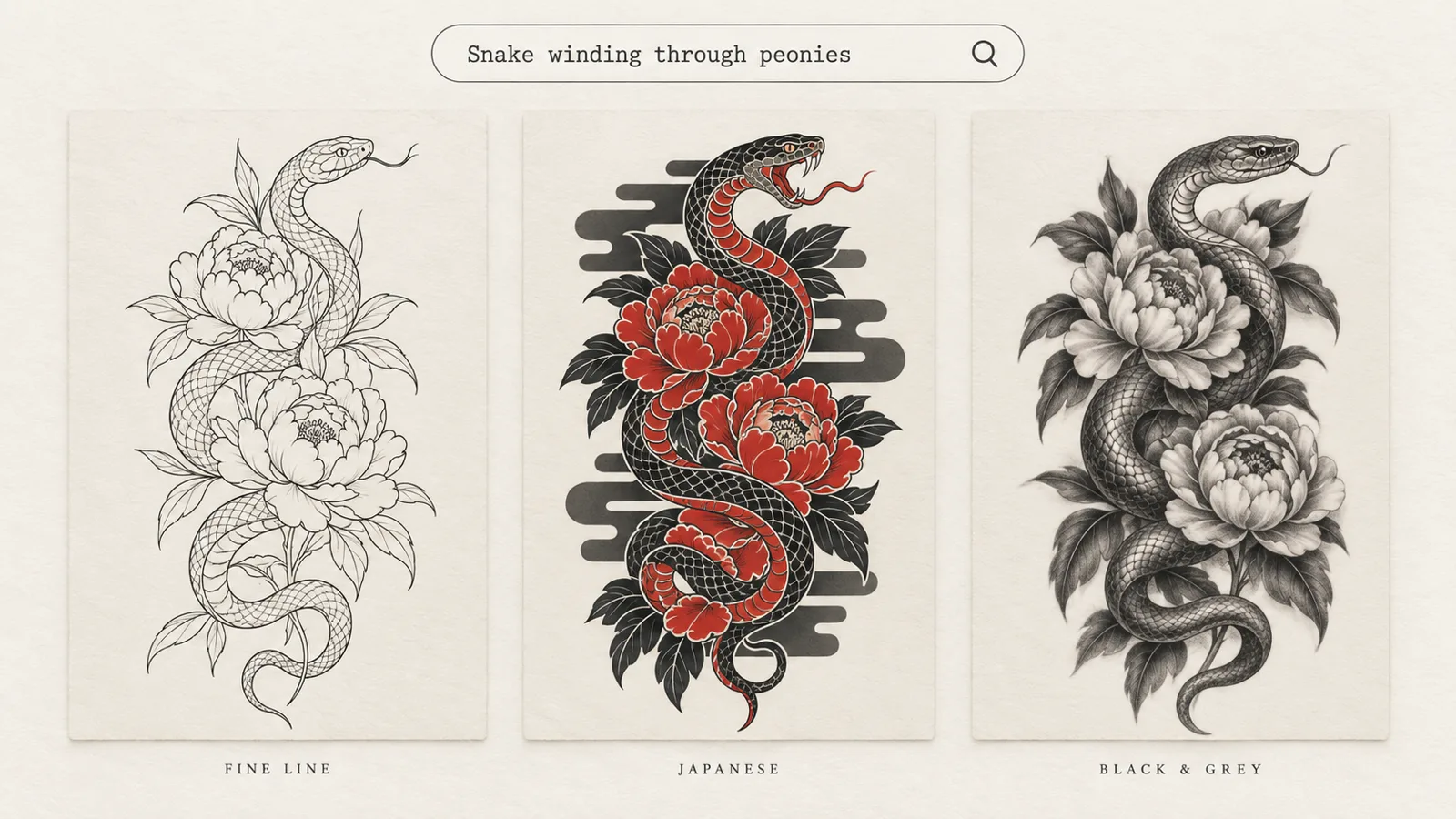
Illustration created for this article: the same prompt, "snake winding through peonies", rendered in three tattoo styles.
Quick answer: An AI tattoo generator turns a written idea, a photo or a name into tattoo artwork in seconds. The best ones are built for skin, not for posters: they let you choose a tattoo style and a body placement, add lettering, preview the result on your own photo and convert it into stencil linework. Treat the output as a strong reference for your artist, not a finished stencil, and check line spacing and lettering before you book.
A note on sources: product details, settings and prices below were checked on tatany.app on October 16, 2026 and can change. Background on ink aging and copyright draws on the sources linked in each section. Our editorial policy explains how we handle claims like these.
What an AI Tattoo Generator Actually Does
At its core, an AI tattoo generator is a text-to-image or image-to-image model wrapped in a tattoo-specific interface. You describe a subject, the model draws it, and the interface nudges the result toward something that reads as tattoo art rather than a digital painting.
That "nudging" is the part that separates a real tattoo design generator from a general image tool with the word "tattoo" typed into the prompt. A general model will happily give you a gorgeous, photographic image with soft gradients, glowing light and a busy background. None of that survives on skin. A tattoo-focused tool constrains the output in ways a tattoo artist would recognize:
- A flat, isolated subject. The design sits on a plain background so it can be traced, resized and placed.
- Real tattoo styles. Fine line, blackwork, Japanese, neo-traditional, black and grey realism, dotwork, watercolor and so on, each with its own rules for line weight, shading and color.
- Placement awareness. A design for a spine is tall and narrow. A design for a forearm wraps. A design for a collarbone is wide and shallow. Generating for the placement first saves you from cropping a square image later.
- Readable linework. Clear outer contours, enough negative space, and detail that is large enough to hold up over time.
When people search for a custom tattoo generator, this is usually what they are after: not "an AI picture of a snake", but a snake designed for their left forearm in a style they already love.
Text, photo or name: three ways to start
Most modern tools accept three kinds of input, and each one suits a different kind of person.
- A written idea. Best when you know the meaning but not the image. "A swallow carrying a rose above a small banner" is specific enough to work with. "Something about freedom" is not, and the result will be generic.
- A photo or sketch. Best for pet portraits, a flower from a wedding bouquet, a child's drawing or your own rough pencil sketch. The model redraws the reference as tattoo linework while keeping the subject recognizable.
- A name or date. Best for memorial pieces and script tattoos. Here the challenge is typography, not illustration, which is why dedicated lettering tools exist.
Why People Are Using AI to Design Tattoos
Tattoo artists have always worked from references: flash sheets, photos, Pinterest boards, a crumpled napkin sketch. AI did not invent the idea of bringing an image to a consultation. It made the image much faster to produce and much closer to what the client actually means.
There are a few practical reasons the approach has caught on:
- Iteration is cheap. You can try the same idea in five styles in the time it used to take to scroll through one Instagram hashtag.
- It makes conversations clearer. "Like this, but thinner lines and no color" is a far easier brief for an artist than a paragraph of adjectives.
- It reduces regret. Seeing a design on a photo of your own arm before you commit is a meaningful safety check for something permanent.
- It helps with hard briefs. Cover-ups, fillers between existing pieces and memorial lettering are all problems where a rough visual helps everyone agree on the direction.
It is also worth being honest about the tension. Artists are divided on AI. A SAS feature on AI in tattooing describes a shop where one artist saw it as a time-saver and a colleague felt it cheapened the craft. The healthiest way to use an AI design is the way you would use any reference: bring it as a starting point and let a professional redraw it for your skin. Most good artists will want to do that anyway.
What to Look for in an AI Tattoo Design Generator
Dozens of tools now call themselves AI tattoo generators, and the roundups that rank them often disagree. Rather than chasing a "best" list, test any tool against the things that decide whether a design can actually be tattooed.
| What to check | Why it matters | What good looks like |
|---|---|---|
| Style control | A prompt alone rarely produces convincing Japanese or trash polka work | A dedicated style picker with real tattoo genres |
| Placement and proportion | A square image cropped onto a spine looks wrong | Choose the body part before generating |
| Lettering | Misspelled names are the most common AI failure | A separate text field and font options you can check letter by letter |
| Linework you can zoom into | Thin, broken or merged lines blur on skin | Full-resolution downloads and clean outer contours |
| Try-on | Size on screen is not size on a body | Preview on your own photo with move, scale and rotate |
| Stencil export | Artists transfer linework, not shaded renders | A clean outline version of the design |
| Privacy and rights | Body photos and personal designs are sensitive | Clear rules on private designs and commercial use |
A useful shortcut: give two or three tools the exact same prompt, for example "fine-line rose on the inner wrist", and compare the results side by side. The differences in linework and lettering become obvious within a minute.
A Closer Look at Tatany
Tatany is a good example of a custom tattoo generator that treats tattoos as a workflow rather than a single image. Instead of one generator box, it groups eight tools into one studio: an AI Tattoo Generator, a Tattoo Font Generator, Image to Tattoo, Tattoo to Stencil, Tattoo Filler, Tattoo Cover Up, Tattoo Try On and an AI Tattoo Idea Generator. Designs from all of them land in a personal library called My Ink, where you can favorite, download and share them.
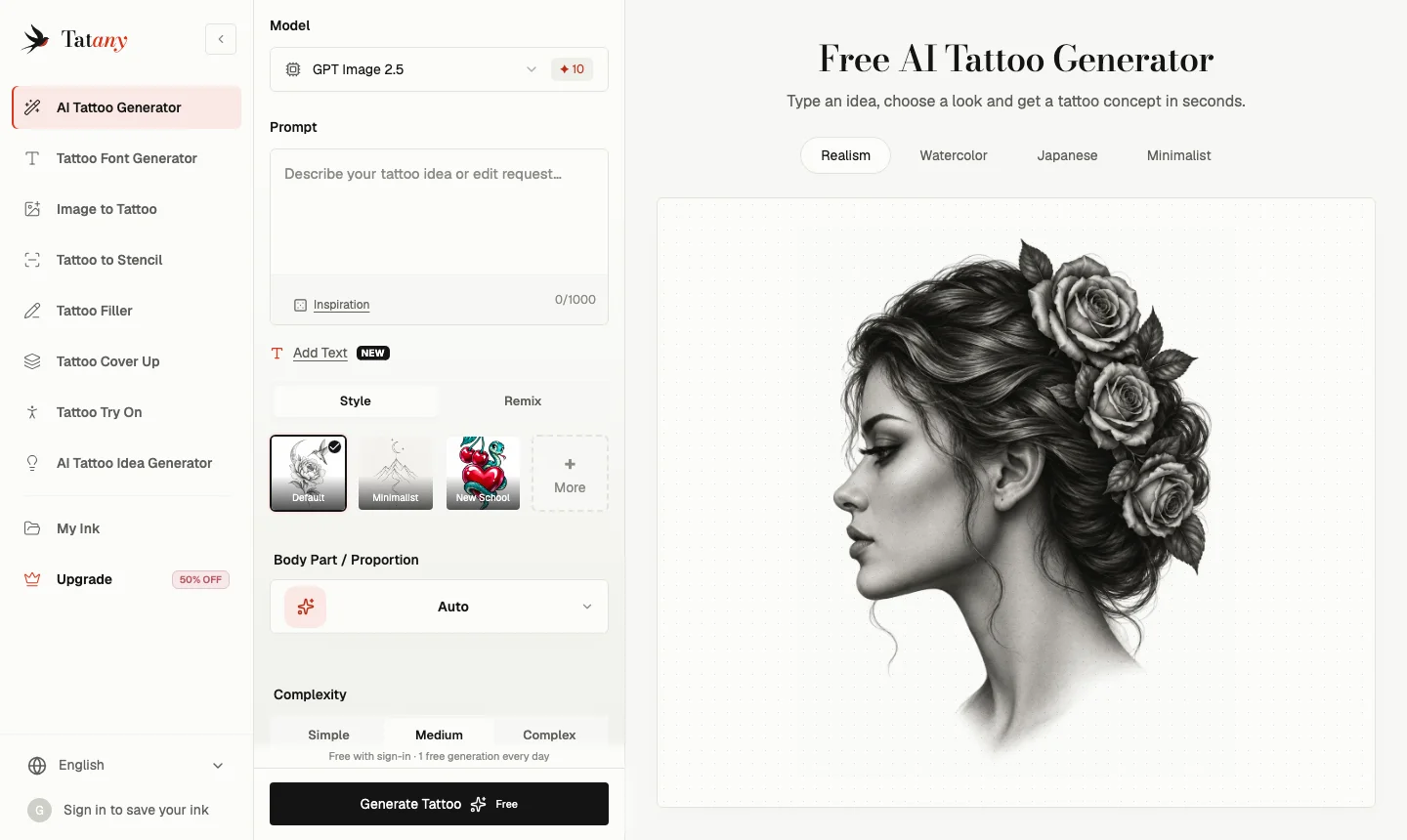
Screenshot of the tatany.app AI tattoo generator, taken October 16, 2026: model picker, prompt box, Add Text, style presets, body part and complexity controls.
The generator itself
The AI tattoo generator works the way the checklist above suggests a good tool should. You write the idea in a prompt box, then set the parts that a prompt handles badly with dedicated controls:
- Style: 12 options, including Minimalist, Blackwork, Japanese, Neo Traditional, Black & Grey, Realism, Dotwork, Trash Polka, Tribal, New School, Surrealism and Watercolor.
- Body part and proportion: an Auto setting plus specific placements (the homepage lists 14), so the artwork is shaped for a forearm, ribs or spine instead of a blank square.
- Complexity: Simple, Medium or Complex, which is a useful lever for small pieces that need to stay legible.
- Add Text: a separate field for a name, date or phrase, with eight font directions, so lettering is not left to chance inside the prompt.
- Remix: start from a reference image and describe only what should change.
The default model at the time of writing is GPT Image 2.5, with Nano Banana 2 offered as an advanced option. The tool shows the credit cost before you press Generate, and a standard generation costs 10 credits.
Its own prompting advice is worth repeating because it applies to every AI tattoo design generator: name the main subject, the supporting elements and how they are arranged, and leave style and placement to the controls. "A swallow carrying a rose above a small banner" beats "a cool bird tattoo" every time.
The tools around the generator
The surrounding tools are where a design goes from interesting to usable.
- Tattoo Font Generator previews 19 classic fonts at once without spending credits, plus an AI lettering option for ornate script.
- Image to Tattoo redraws a photo, sketch or logo you own as tattoo art, with a before and after comparison.
- Tattoo to Stencil turns a design or a photo of an existing tattoo into flat linework, with three modes: Stencil Outline, Original Tattoo and AI Design Upgrade.
- Tattoo Try On places a design on a photo of your body. Classic mode is free and runs in your browser; AI mode renders a placement that follows the curve and lighting of the skin.
- Tattoo Cover Up lets you brush over an old tattoo and choose between a full cover and a "rework and extend" approach.
- Tattoo Filler proposes small elements such as stars, leaves or dotwork to fill gaps between existing pieces.
- AI Tattoo Idea Generator returns six concepts based on your interests and story, for when you are not sure what you want yet.
Is There a Truly Free AI Tattoo Generator?
"Free" is the most searched word in this category and the most loosely used. In practice, a free AI tattoo generator almost always means one of three things: a small number of trial credits, a daily allowance, or unlimited low-resolution previews with watermarks. Image models cost real money to run, so genuinely unlimited, high-resolution, private and watermark-free generation is rare.
Tatany's version is a fairly generous example of the daily-allowance model. A free account gets one free standard generation per day, shared across all eight tools and reset at midnight UTC. New accounts also receive 15 welcome credits, valid for 30 days after email verification. Classic font previews and Classic try-on previews are always free, which means you can test lettering and placement without spending anything.
Paid plans add the things that matter once you are serious about a design: private designs, 2K HD output, watermark-free downloads and a commercial-use license. At the time of writing, with a 50% annual discount running, plans were listed from $4.95 per month (Basic, billed $59.40 per year), with Pro at $9.90 per month adding print-at-scale stencil PDFs and Studio at $19.90 per month adding 4K output and four variations per click. Check the current Tatany pricing before you buy, because promotions change.
A sensible way to use any free tier: spend your free generations exploring styles and placements, and only pay when you have a direction you want in high resolution and private.
From Prompt to Skin: A Practical Workflow
Here is the workflow we would recommend to a friend, regardless of which tool they use. We use Tatany's tool names because it covers every step in one place.
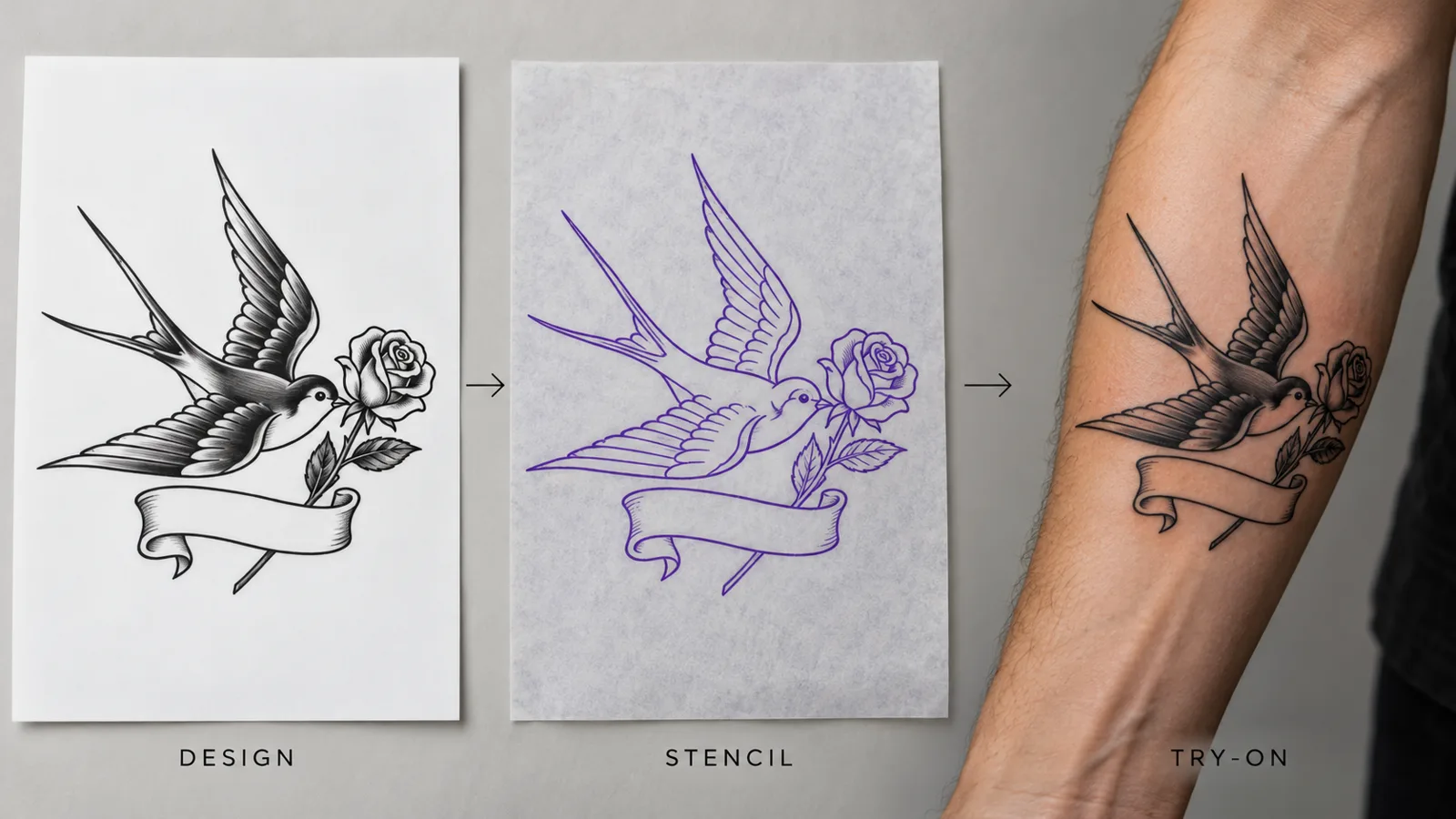
Illustration created for this article: design, stencil and try-on for the same swallow-and-rose piece. The arm shown is fictional.
Step 1: Write the brief before you write the prompt
Spend two minutes on paper first. Write down the subject, two or three supporting elements, the feeling you want, the placement and the rough size. "Swallow with a rose, banner reading a date, neo-traditional, inner forearm, about 12 cm tall" is a brief. Everything after this step is just translating it.
If you are stuck at this stage, an idea generator can help. Describe your work, hobbies and a story that matters to you and use the suggestions as a jumping-off point, not a final answer.
Step 2: Generate in two or three styles
Run the same prompt in at least two styles you are curious about. The picture at the top of this article shows why: the same snake and peonies feel delicate in fine line, bold and traditional in Japanese, and soft and dimensional in black and grey. Seeing them side by side usually settles the style question faster than any amount of reading.
Keep complexity at Simple or Medium for anything smaller than a palm. Complex designs look impressive on a screen and turn muddy at small sizes.
Step 3: Fix the lettering separately
If your design includes a name or date, check every character at full zoom. AI image models are much better at text than they were, but swapped letters, doubled strokes and uneven spacing still happen. Use a dedicated font tool, compare several scripts, and confirm the spelling with the person the tattoo honors before it goes anywhere near a needle.
Step 4: Zoom into the linework
Before you download, zoom in and look for three problems:
- Hairline strokes that will be too thin to hold.
- Lines that nearly touch, which tend to merge over the years.
- Tiny enclosed spaces, such as the inside of small letters or dense petals, that fill in.
Ink does not stay perfectly crisp. Pigment slowly spreads in the skin over time, and fine lines and tight negative spaces are the first to blur, as Ray Studios explains in its guide to tattoo blurring. A design with bolder outer contours and generous spacing will age better than one that looks perfect at 400% zoom.
Step 5: Turn it into a stencil
Artists transfer linework to skin, not shaded renders. Converting your design into an outline version early helps you see whether it still reads without shading. If the stencil looks confusing, the tattoo will too. In Tatany this is the Tattoo to Stencil tool; its Stencil Outline mode keeps continuous contour lines and drops shading, which is exactly the version to show an artist.
Step 6: Try it on your own body
Size is the most common regret with any tattoo, and it is very hard to judge on a screen. Take a sharp, evenly lit, straight-on photo of the placement, then move, scale and rotate the design on it. A free browser-based preview like the virtual tattoo try-on is enough to answer the big questions: Is it too small to read? Does it fight with the shape of the muscle? Does it crowd an existing piece? Treat the preview as a guide to position and proportion, not a measurement; your artist confirms real dimensions.
Step 7: Book the consultation and let the artist take over
Bring the original design file, the stencil version and your try-on screenshot. Explain what you love about it and what you are unsure about. A good artist will redraw the piece to suit your skin, the placement and their own technique, and the result will almost always be better than the AI version. That is the point. The AI got you to a clear, shared starting place in an evening instead of weeks.
Special Cases: Cover-Ups, Fillers and Memorial Pieces
Some of the most valuable uses of an AI tattoo design generator are the briefs that are hardest to describe in words.
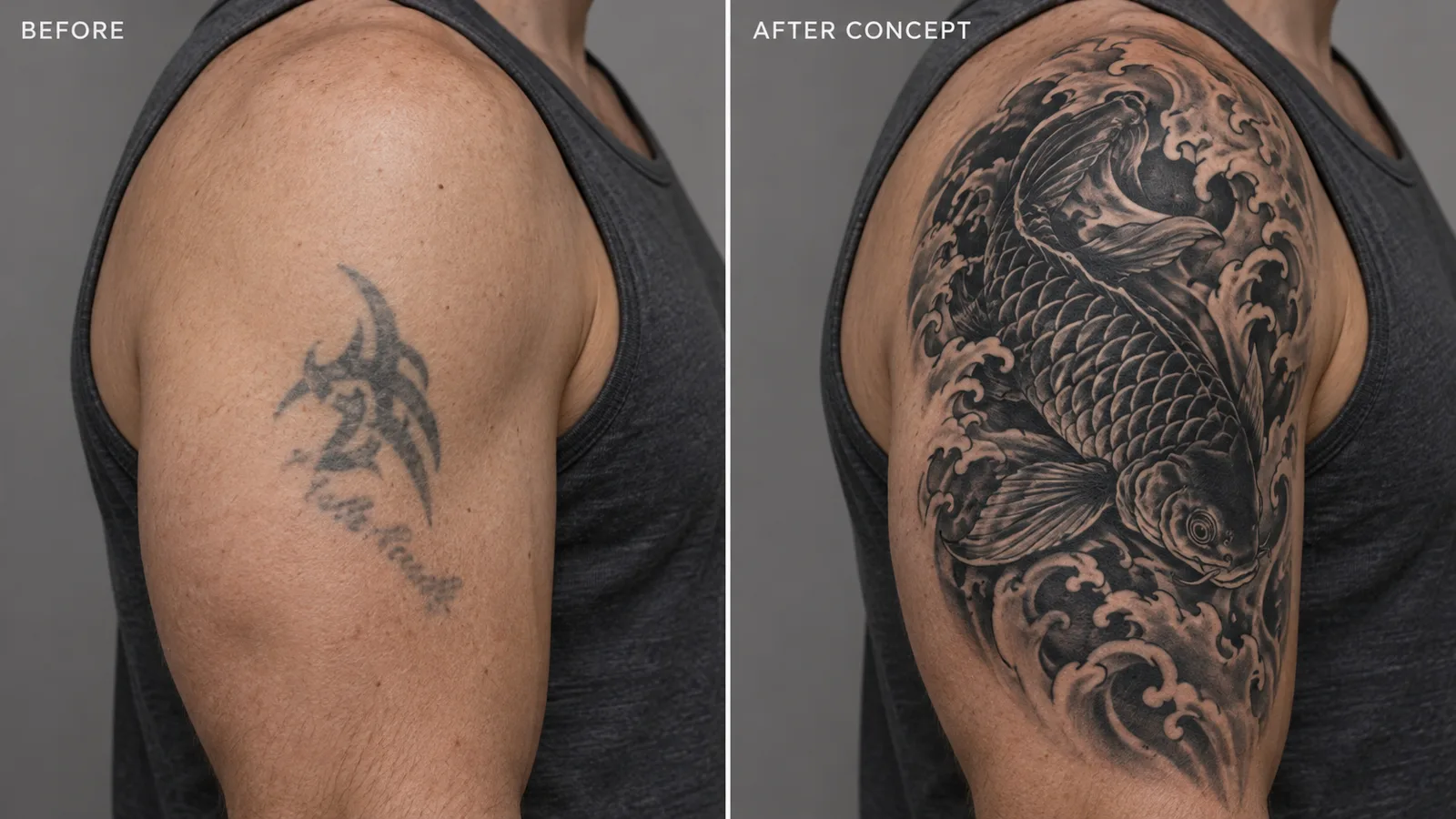
Illustration created for this article: an old faded tattoo and an AI cover-up concept placing dense dark areas over the old ink. The arm shown is fictional.
Cover-ups. Covering old ink is a technical puzzle: the new design needs dark, dense areas exactly where the old lines are, and it usually has to be larger. A cover-up tool that lets you mark the old tattoo and generate around it gives you a realistic sense of how big and how dark the new piece needs to be. Expect your artist to adjust it; laser lightening sessions are sometimes recommended first for very dark or very large originals.
Fillers. If you have a sleeve or a patchwork collection with awkward gaps, small filler elements such as stars, leaves, wind bars or dotwork tie everything together. Generating a few options against a photo of your existing work is far faster than trying to imagine them.
Memorial pieces. Names, dates, handwriting and portraits of people or pets carry the most emotional weight and the least tolerance for mistakes. Use Image to Tattoo for portraits of pets or flowers, a font tool for lettering, and take extra care checking every detail with family before booking.
Ownership, Copyright and Etiquette
Two questions come up constantly: who owns an AI tattoo design, and is it fair to bring one to an artist?
On ownership, the honest answer is that the law is still settling. In the United States, the Copyright Office's 2025 report on copyrightability concluded that prompts alone do not give enough human control to make someone the author of an AI output, while human selection, arrangement and creative modification can still be protected. In practice, that means a raw AI image is hard to claim as your exclusive work, but a design your artist substantially redraws is a different matter. Separately, a tool's terms decide what you are allowed to do with outputs; Tatany, for example, lists a commercial-use license on its paid plans.
On etiquette, a few simple rules keep everyone happy:
- Do not ask an artist to copy another tattoo artist's work. Do not use AI to imitate a living artist's signature style and then ask someone else to ink it.
- Only upload images you own or have permission to use. That includes photos of other people and logos.
- Expect to pay for drawing time. A reference saves time; it does not replace the artist's design work.
- Be open to changes. The artist is the one who has to make it work on skin for decades.
Frequently Asked Questions
What is the best AI tattoo generator?
There is no single winner for everyone. Look for a tool with real tattoo styles, placement controls, separate lettering, a try-on preview and stencil export. A tattoo-specific studio such as Tatany covers all of those in one place, while general image tools can still be useful for brainstorming loose ideas.
Is there a free AI tattoo generator with no sign-up?
A few tools offer anonymous previews, but most free tiers require an account because each generation costs money to run. Tatany gives signed-in users one free standard generation per day, plus 15 welcome credits on signup, and its Classic try-on and font previews are free.
Can I give an AI tattoo design directly to my tattoo artist?
You can bring it, and most artists welcome a clear reference. Expect them to redraw it, because line weight, spacing and proportions need to be adjusted for skin and placement. Bring a stencil version and a try-on screenshot to make the consultation easier.
Can an AI tattoo generator write names and dates correctly?
Usually, but not always. Always zoom in and check each letter and number, and use a dedicated lettering tool for anything important. A spelling mistake in a memorial tattoo is not a risk worth taking.
How do I make an AI tattoo design that ages well?
Keep it larger rather than smaller, ask for bold outer lines and generous negative space, avoid tiny enclosed details, and choose a lower complexity for small placements. Then let your artist adapt the line weights to your skin.
Can AI help with a tattoo cover-up?
Yes. A cover-up tool can show where dense, dark areas need to sit over the old ink and how large the new piece must be. Your artist will confirm whether the old tattoo needs lightening first.
The Bottom Line
An AI tattoo generator will not replace a tattoo artist, and the good ones do not try to. What it does is remove the hardest part of getting a custom tattoo: turning a vague idea into a clear, shared picture. Use it to explore styles, settle placement, test lettering and see the design on your own body. Then bring a clean stencil and a try-on to a professional and let them make it permanent.
If you want to try the full workflow in one place, design your own custom tattoo with Tatany, starting with the free daily generation, and see your idea take shape before you book.