
The bicep heart is a seven-second clip built out of negative space. One arm bends, one hand curls over it, and the gap between the two happens to be a heart. There is no effect layer, no sticker, no filter — which is exactly why a video model finds it so much harder than it looks, and why so many first attempts come back with a closed fist sitting on a bicep instead of a shape anyone recognises.
This is the how-to for that clip, written against Bicep Heart Trend AI, the browser generator at bicephearttrendai.video that animates the pose from a single photo. We read its homepage, how-to page, photo guide, trend page, FAQ, pricing page and ten-tool comparison page on November 9, 2026. We did not buy a render, so everything below about how a clip behaves is either a property of how image-to-video models work, or the site's own published description of its two test renders from November 8 — not a clip we paid for and watched. Prices and model behaviour move during a trend week; if the number on the button disagrees with this page, the button is attached to your account and this page is not. Our editorial policy explains how we treat claims we have not reproduced.
Quick answer: Upload one waist-up photo of one adult, facing the camera, with both arms, both elbows and both hands fully inside the frame and a little air above the head. Short sleeves or bare arms; you do not need to be flexing. On Bicep Heart Trend AI you pick Standard 480p (6 credits) or HD 720p (15 credits), keep the trend sound or switch it to Silent, tick the consent box, and render a vertical 9:16 MP4 of about seven seconds. Then watch the whole clip — not the last frame — for the heart-shaped gap, the finger count, and the hand sitting high on the bicep rather than down at the elbow. The free alternative is to film the pose yourself with a propped-up phone, which costs nothing and removes the hand problem entirely.
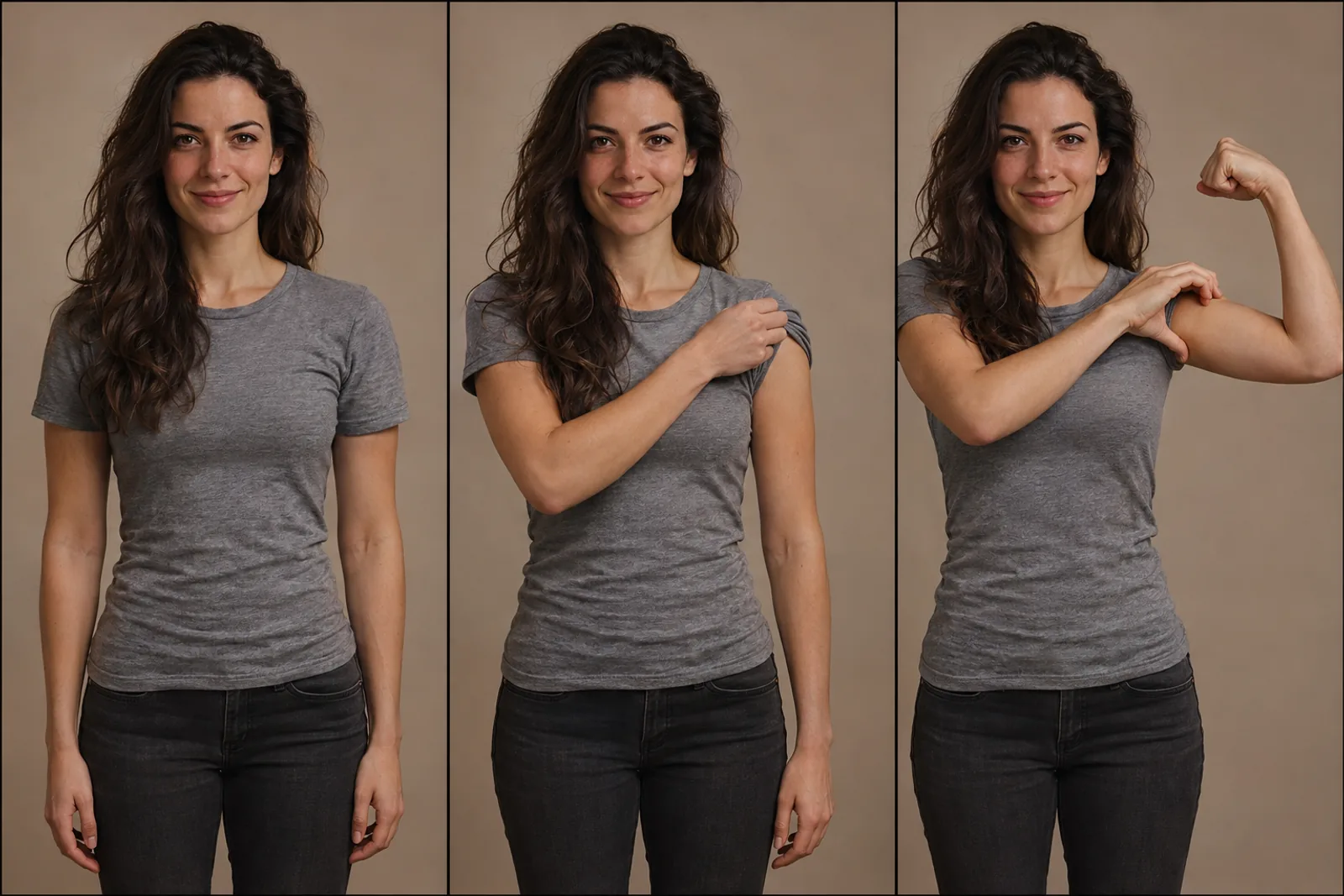
Illustration made for this article. It follows the three beats the generator prints on its own product pages: a relaxed stance, the sleeve pushed toward the shoulder, and the flex with the opposite hand curled over the top of the bicep. The person is fictional. This is not a screenshot of bicephearttrendai.video and not a frame from a render we bought.
Five Searches, One Gesture
The keywords that bring people to this page describe the same seven seconds from five different angles, and the products behind them do not all agree.
Bicep Heart Trend AI is the name of an independent web app and, loosely, the name of the format. The domain is the part that matters. bicephearttrendai.video is one site; bicepheart-ai.video, bicepheart.video, bicepheart.net, thebicepheart.com, bicepheart.app and heartbicepai.com are others, and the site's own comparison page lists ten of them side by side, with its own price in the same table as its competitors'. Signing up at one leaves you with nothing at the next, and credits do not travel between them.
Bicep Heart AI Video Generator describes the output rather than the input. You leave with an MP4. You do not leave with a CapCut template you still have to time by hand, and you do not leave with a still image of the finished pose that someone else has to animate.
Bicep Heart Video from Photo is the constraint that decides whether your clip works at all. One file, one person, both arms legible. The pose has three parts in play — the bent arm, the free hand, and the gap between them — and a video model can only animate what it can see. This is the line most people fail on, and it is entirely fixable before checkout.
Viral Bicep Heart TikTok Trend is the social pattern around the pose: a shy smile, a sleeve pushed up, the flex, the hand closing the shape, then a two-second hold. The trend is older than any one website and much larger than any one generator. A generator is simply a way to enter it from a photograph when you would rather not film.
AI Bicep Heart Pose Generator frames the same product as a pose machine rather than a video machine, which is the most accurate description of what actually happens: you are not editing footage, and you are not writing a prompt. The pose is scripted, and your photo is the identity that gets dropped into it.
Five phrases, one upload tile. The way through all of them is not a better prompt. It is a photo with both arms in it.
Where the Trend Actually Comes From
The format has a documented birthday, which is unusual for a meme and useful if you are deciding whether you are buying the thing you meant.
Know Your Meme added its entry on November 6, 2026, and traces the trend to a TikTok posted by @kavithageorge on October 31, 2026, captioned "have you ever heard of a bicep heart?" — a clip that passed 5.3 million views inside a week. Know Your Meme then logs the spread date by date: @chrisphamne on November 1 with more than 8.2 million views in five days, an Instagram couple's version by @baldbangbaddie on November 3, a tutorial by @brookemonk_ on November 4 that collected 8.3 million views in two days, and @jennifer_jinn on November 5 asking people to send her bicep hearts because she was sad, which drew more than 314,000 likes in a day.
Other write-ups disagree at the edges, and the disagreement is worth knowing. Some date the move to TikTok from October 26 and credit earlier posts by @hunnybakes and @mckennacrisp, and at least one traces the gesture's origin to a visual joke on X, where people pointed out that a flexed bicep already looks like half a heart. The site's own trend page is careful about this and declines to name a single inventor. That caution is the right instinct: trend histories are almost always wrong by three days and one username.
The sound is the other unsettled detail, and it is the one that decides whether your clip reads as the trend. Most large posts use a slowed jersey-club track that third-party TikTok audio trackers identify as "Wyw my sweetie #JerseyClub (Super Slowed)" by nissi & 25Hzz, re-uploaded by an account called trendformusic; one tracker counted more than 120,000 videos on that audio as of November 7, 2026, with roughly 12,000 added in a single day. Bicep Heart Trend AI lays that trend audio onto your clip by default and offers a Silent export if you would rather attach sound inside TikTok or Instagram, where your account's music rules apply.
Why it spread is worth one paragraph, because it explains what to protect in your own version. The heart is formed by the bend of the arm and the curve of the fingers, not by muscle size. A slim arm makes the shape just as well as a big one, and being visibly unsure about your biceps is part of the joke. That is a trend almost anybody can perform in one take, in one room, with no editing skill — which is also precisely the gap a generator is selling into.
Why This Pose Is Hard for a Video Model
Hands are the hardest thing in image-to-video, and the bicep heart is unusually hostile even by hand standards, because the entire payoff is a hole.
The model has to do four things at once. It has to lift the forearm to roughly shoulder height so the upper arm and forearm form an inverted V beside the head. It has to keep the elbow open, because a folded-shut elbow erases the arc of the arm and leaves nothing for the hand to close against. It has to bring the free hand across the body with the thumb pointing down and stop it high on the upper arm, just under the fist. And then it has to curl four fingers loosely over the top edge of the bicep so that the space they enclose against the curve reads as a heart.
The second and fourth steps are where renders fail. The natural instinct — the one almost every person has on a first attempt — is to grab the bicep from the outside with the thumb up, the way you would measure it. That gesture produces a closed fist pressed against a muscle. It does not produce a heart, because there is no enclosed gap. Ask a model to guess and you get a very sincere, very wrong fist.
Nothing in the clip is drawn. No sticker, no emoji, no outline. The heart is negative space, which is why it reads instantly when the hand sits right and disappears completely when the hand sits one centimetre low. Viewers do not consciously measure that gap, but they flinch at it, and the comment section will tell you.
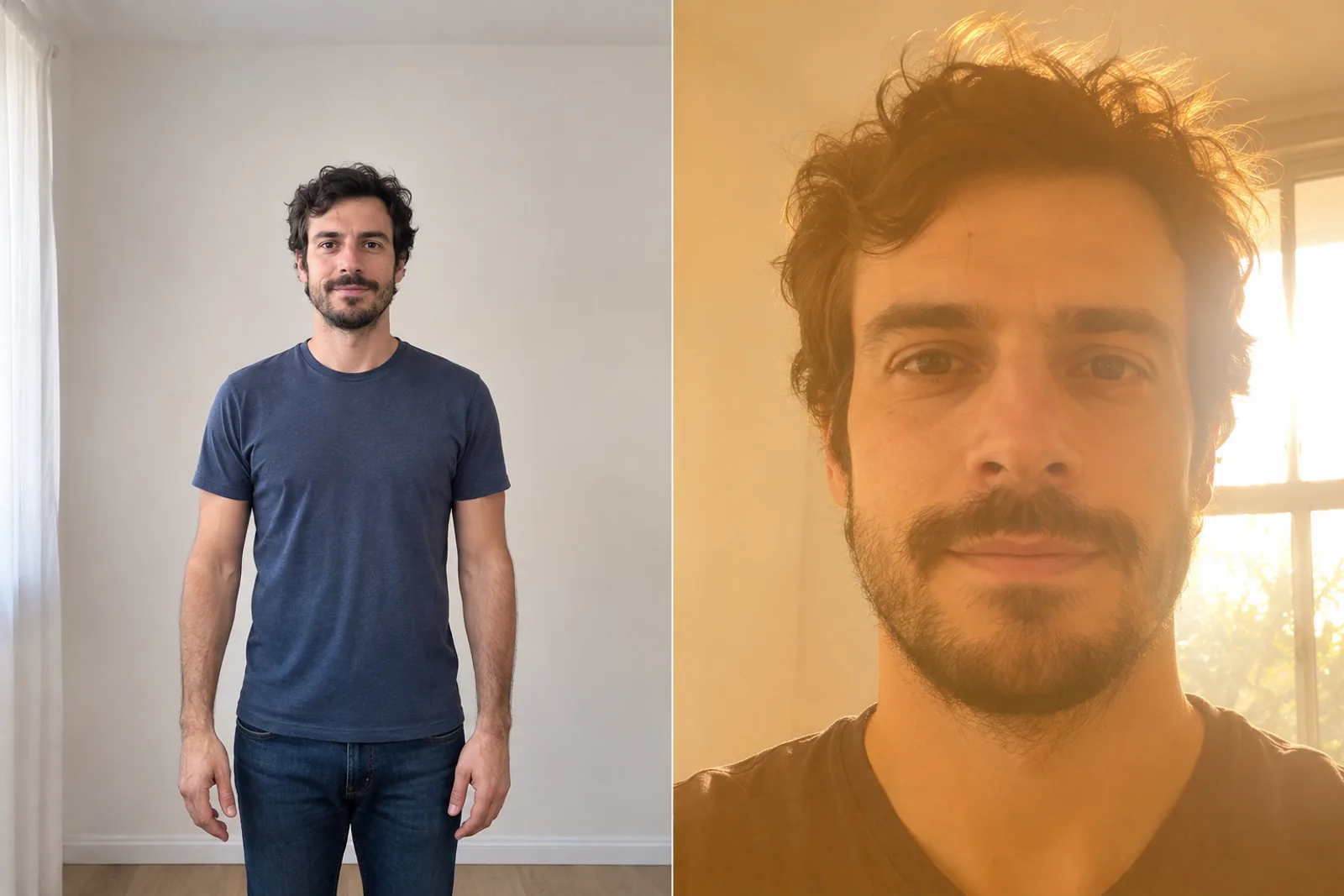
Illustration made for this article. The left frame is what the photo guide asks for — one adult, waist up, both hands in frame, air above the head, short sleeves. The right frame is the input that produces most broken renders, because there is no arm in it to animate. The person is fictional.
The Pose in Three Beats
You do not have to invent the movement, but you do have to recognise a correct result, and that means knowing the move. The site prints its own timing on every product page.
| Time | What happens |
|---|---|
| 0–3 s | The free hand grips the opposite upper arm and pushes the sleeve toward the shoulder. |
| 3–4 s | That arm flexes with the fist beside the head, and the other hand curls over the bicep. |
| 4–7 s | The heart holds. No captions, no stickers and no emoji are added to the frame. |
That is the whole choreography, and it is deliberately unambitious: one gesture, one hold, no camera move. For a trend, brevity is a feature — it is what makes the format loopable and what makes it cheap to reproduce. For a generator, it is the thing that makes the job tractable at all.
Making the Clip, Step by Step
Everything happens in a browser, on a phone or a desktop, with no app to install and no prompt field to fill.
1. Choose the photo by what it can show, not by how you look in it. The best input is almost always the boring one: sharp, evenly lit, waist-up, arms down at your sides, taken a couple of steps back. Short sleeves or bare arms. No sunglasses, no heavy beauty filter, no group shot. A group photo is the single most common bad input, because with two people in frame the model has to guess whose arms to animate.
2. Fix the framing before you upload. You need head, both elbows and both hands, plus room above your head for the fist to land. A photo cropped at the hairline gives the fist nowhere to go. A full-body shot taken from across the street makes the hands too small to matter. A tall photo keeps more of you inside a 9:16 crop; a wide one gets trimmed. The accepted formats are JPG, PNG and WebP up to 10 MB and at least 300 by 300 pixels, which is generous on purpose — the limit is composition, not file size.
3. Do not try to be in the pose already. Upload a relaxed stance. The generator supplies the flex, the reach and the curl, and a photo where your arms are already crossed or already flexed can actually make the motion harder to read, because there is less of the transition for the model to infer.
4. Treat resolution and sound as two separate decisions. On the site, 480p is 6 credits and 720p is 15, which is a 2.5× jump for a change of frame size rather than a change of model. Sound is independent again: the trend audio is what makes your clip sit next to the thousand other posts in the feed, and Silent is what you want if you will attach a track inside TikTok, where your account's licensing rules decide what you are allowed to use.
5. Tick the consent box only when it is true. The form asks you to confirm that every person shown agreed, is 18 or older, and is not a famous or public person. Those are two different permissions stacked in one sentence: agreeing to be animated is not the same as agreeing to be posted. If you would not send the finished clip to the person in it, you do not have the second one.
6. Watch the whole clip, not the last frame. This is the step that separates a clip people share from a clip people screenshot to make fun of. Play it at full size, once with sound, and check five things: a normal number of fingers on each hand, the curled hand high under the fist rather than down at the elbow, a clear heart-shaped gap that actually holds, your face and outfit still recognisably yours, and no smearing around the sleeve as the arm bends.
7. Label it, then post it. The clip is a video of you performing a pose you did not perform, in a room you may not have been in. A joke caption keeps the joke intact. A caption that claims the video was filmed does something else entirely. Turn on the platform's AI-generated label and let the clip be what it is.
If you would rather work from a checklist than a paragraph, the site's own bicep heart photo guide tabulates good and risky uploads side by side, and its how-to page runs the same five steps with screenshots.
The Photo Audit
The photo is the only variable you fully control, and it is where nearly every disappointment starts. Read the list below as an audit of the file on your camera roll, not as advice about how to look.
Works. One adult, centred, waist up, both arms visible down to the hands, short or no sleeves, daylight or a bright indoor room, face uncovered, arms relaxed at your sides, and a plain background so the silhouette of your arm stays legible.
Fails, quietly. A face-only selfie. A mirror selfie where the phone hides one arm and the reflection flips the image. A group photo. A full-body shot from far away. Long loose sleeves that swallow the bicep. A bulky jacket. Backlight that turns your face into a silhouette. A heavy beauty filter that has already softened the skin the model needs to read. Arms already crossed, or hands already touching, which leaves the model no visible transition to animate.
Two clarifications worth having, because they come up in every thread about this trend. A selfie is fine if it was taken at arm's length from the waist up with both hands inside the frame — most are not, which is why a timer shot or a photo taken by somebody else works better. And an old photo is fine if it is sharp and unfiltered; the failure mode with aged or edited photos is face drift during the motion, not age itself.
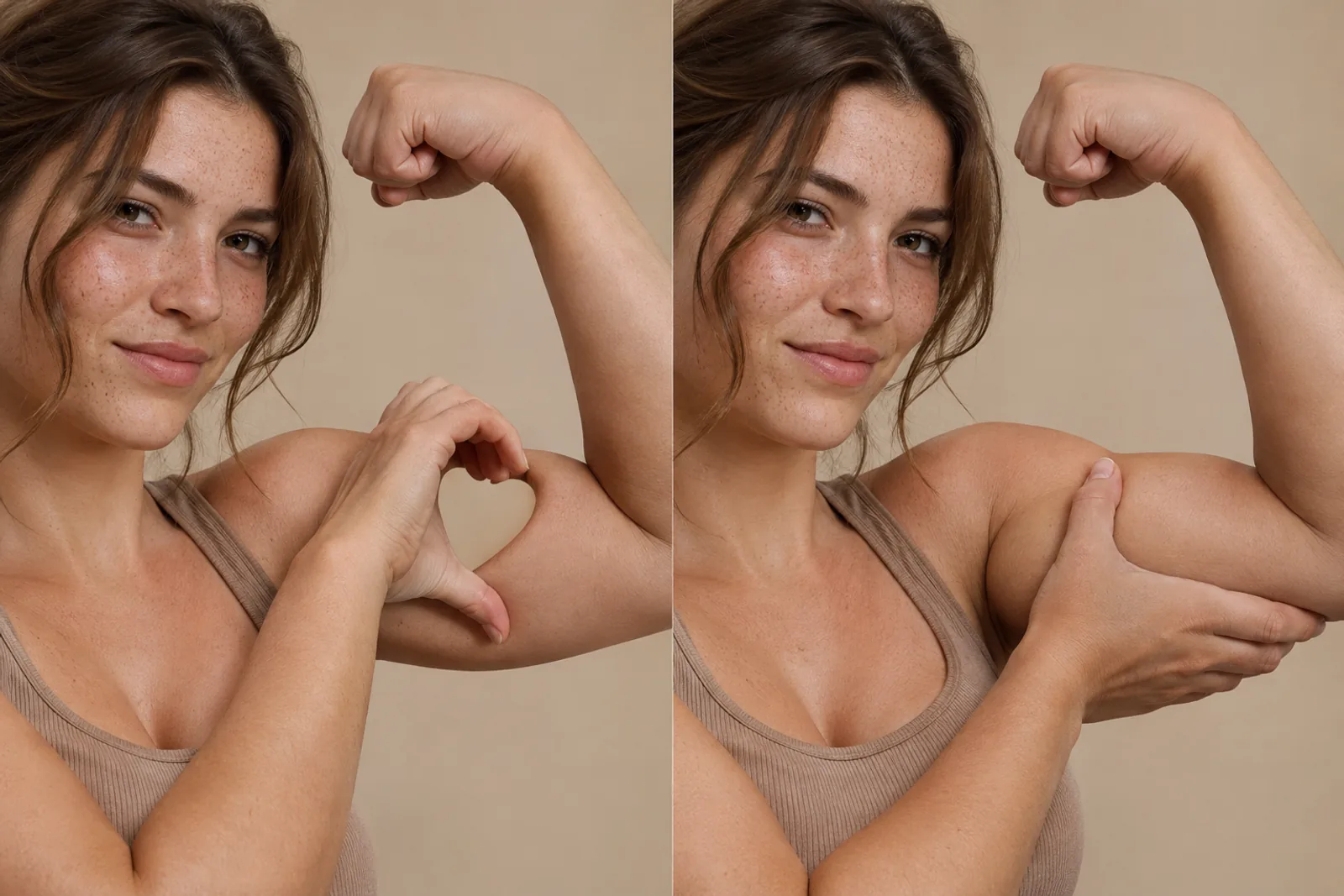
Illustration made for this article. It isolates the one difference that decides the pose: whether the free hand curls over the top edge of the bicep so the fingers enclose a gap, or grips the back of the arm where the shape collapses into a plain flex. The person is fictional, and the two frames are an illustration of the difference rather than a before-and-after of a real render.
What the Credits Actually Buy
The site sells three one-time packs and nothing renews. These are the prices printed on its pricing page.
| Pack | Price | Credits | What that buys at the listed rates |
|---|---|---|---|
| Single | $5.99 once | 6 | One 480p clip, and no retake |
| Trio Pack | $12.99 once | 18 | Three 480p clips, or one 720p with 3 credits spare |
| Five Pack | $19.99 once | 30 | Five 480p clips, or two 720p |
Check the arithmetic before you take the cheapest option. Six credits is exactly one 480p clip, so the $5.99 Single buys a single attempt with nothing left over. If a first try comes back with a heart that never closed — and the site's own two published tests both show drift worth retrying — the Single leaves you buying a second pack. The Trio at $12.99 is the honest purchase for anyone who expects to want two versions of the same pose, and it is also the entry point to 720p at 15 credits a clip.
Three more lines from that page matter. Accounts start at zero credits, so there is no free first render and no free preview. Credits in a pack carry no expiry date. And a render that fails or is blocked returns its credits to your balance automatically, with no support ticket — which is a refund of credits, not cash. The site also says that if a clip finishes but is clearly broken, you can email support within seven days for a restore, which is a broader promise than most tools of this size make and worth testing if it happens to you.
When the Heart Doesn't Close
Four failure modes account for nearly every bad render, and each has a different likely fix.
The hand landed near the elbow. This is the most common miss, and it is usually a photo problem. If the elbow is cropped or occluded, the model has no anchor for where the upper arm ends. Re-shoot with the whole arm in frame and space around the raised elbow.
The fist closed but there is no gap. The model chose the outside-grab interpretation instead of the over-the-top curl. Change the photo before you change anything else: short sleeves, both hands visible, arm relaxed rather than already bent. A new render is a new paid attempt, not a guaranteed correction.
The fingers merged into the arm. Very common with long sleeves, loose fabric, or a sharp shadow across the bicep. A tank top or a fitted tee gives the cleanest edge for the model to trace.
The face drifted. Usually a small, soft or heavily filtered source image. A sharp, recent, unfiltered photo is the fix, and this is the one failure mode where a higher resolution output will not help, because the information was never in the input.
There is a fifth thing that is not a failure: the arm comes back noticeably more muscular than the person in the photo. Both of the site's own November 8 test renders show it — a slim woman's arm thickening at the flex, an average-build man's arm reading stronger than his build — and the site prints that in its own table rather than hiding it. In one of the two, a short sleeve also turned into a tank top when the hand gripped it. If your arms looking exactly as they are matters to you, film the pose; if you want the trend and can live with a flattering flex, this is the cost of admission and you should know it before you pay.
Four Ways to Do the Trend
A generator is one route, and the site's own how-to page is unusually direct about the other three.
| Method | What you get | Do your arms actually move into the pose? | Cost |
|---|---|---|---|
| Film it yourself | A real video of you | Yes, you perform it | Free |
| Still-photo pose edit | One picture of the finished pose | No, it is a still | Often free or included in a plan |
| Slideshow or pan-and-zoom template | Your photo with motion added | No | Usually free |
| AI image-to-video, dedicated bicep heart app | An animated 9:16 MP4 of about seven seconds | Yes, generated from one photo | From $5.99 |
The middle two rows are where most of this trend's disappointment lives. A chat assistant with an image tool can put you in the pose beautifully and hand you a JPEG. An editing template can make that JPEG move in a way that reads as video at thumbnail size. Neither one moves your arm through the gesture, so neither one produces the reveal that the trend is actually about.
Filming has advantages the table undersells: it is free, it is genuinely you, and it takes about a minute once the phone is propped at chest height. It also removes the hand problem entirely, because your hand is your hand. If the trend is the only thing you want, that is genuinely the better product and the site says so itself.
Generation has one advantage filming does not: you can do the trend without a willing scene partner, without a mirror, without a tripod, and without the twenty takes it takes to get the fingers right while a camera runs. For anyone who has watched the trend for a week and not posted, that is the real offer — the pose, solved, from a photo you already have. There is a second bicep heart generator doing genuinely similar work at a different price point, covered in our one-photo bicep heart walkthrough, if you want to compare two quotes before you spend anything.
Who This Fits, and Who It Doesn't
It fits you if you have a decent waist-up photo, you have watched the trend for a week, and you would rather spend $5.99 than learn to hold a pose for seven seconds while a phone films you. It fits a couple or two friends running the same generator with their own photos. It fits a smaller creator who wants to be in the trend without renting a studio or asking someone to hold a camera. It fits anyone whose arms are not the point, because in this trend they never were.
It fits badly if you need the clip to be footage of a real moment, if you want the room in your photo preserved, if you want your arms to look exactly as they do, or if the person in the photo has not agreed to both the animation and the post. It also fits badly if you were hoping for a free try — the site is explicit that there is no free render, and the free route to the trend is the one that has always existed.
The practical version is short: pick the boring photo, pay for two attempts rather than one, watch the whole clip for the gap before you download, and label the post. That is the entire skill this trend asks for.
Frequently Asked Questions
Do I need to be flexing in the photo?
No. A relaxed stance with both arms visible is the input the generator is built around; the flex, the reach and the curl are added for you. A photo where you are already posing can actually make the motion harder to read.
How many photos do I need?
One. A second photo, a video of yourself, or a written prompt is not needed for the bicep heart, and the generator has no prompt field.
Can I use a selfie?
Yes, if it shows you from the waist up with both arms and both hands inside the frame. An arm's-length selfie usually crops one arm out, so a timer shot or a photo taken by somebody else tends to work better.
What exactly do I get for my credits?
A vertical 9:16 MP4 of about seven seconds, at 480p or 720p, with no watermark, saved to your account's creations so you can download it again. Not a still image, not a template.
How long does a render take?
It depends on the queue and the site does not promise a number. The job runs in the background and is saved to your library, so you can close the tab and come back rather than watching a progress bar.
Can I fix one part of a clip?
No. The generator makes a new clip each time rather than editing parts of an existing one, which is why the photo is the lever worth adjusting between attempts.
Does the clip include the trend sound?
Yes, by default, or it exports silent if you choose Silent before rendering. The site does not license that audio for you, so a business account should usually take the silent export and attach a commercially licensed track inside the posting app.
Is any of this free?
Not from the generator. Accounts start at zero credits and there is no free preview. Filming the pose yourself is the free route, and it is also the version where the arms are genuinely yours.
Can I post the result commercially?
The site's pricing FAQ says generated clips can go into your own projects, including paid ones, provided you hold the rights to the photo you uploaded, use licensed audio, and do not imply that TikTok or the people behind the trend endorse the post. Read the terms on the day — they are the version that binds you, not this summary.
The Short Version
The bicep heart looks like a two-second trend and behaves like a small piece of geometry. One arm has to bend without closing, one hand has to arrive high with the thumb down, and the space between them has to survive being rendered by a model that has never seen your arm move. Everything that goes wrong in a bad AI attempt traces back to one of those three, and two of the three are decided by the photo you upload rather than by the tool you pay.
So upload the boring photo. Buy enough credits for a second try. Watch the whole clip for the gap. Label it when you post. And if the clip that comes back is almost right, remember that the honest free alternative has been sitting in your pocket the entire time — prop up the phone, push up the sleeve, and make the shape with an arm the model cannot get wrong.
If you want to see the generator's own published attempts before you decide, Bicep Heart Trend AI prints its two November 8 test renders with their weak spots listed, including the arm-size drift and the sleeve that changed shape. That is a better predictor of your result than any homepage montage, and it is the page we would read first.