
Five searches land on the same phone-shaped file. Image to Video AI names the pipeline: a still goes in, a clip comes out. Photo to Video AI is the same pipeline in the words people used before the models got reliable. AI Viral Video Generator names the hope, which is that the clip will travel. AI Video Trend Generator names the format, a dance or a desk concert or a car that leaves the ground, already familiar to the feed. AI TikTok Video Generator names the frame: vertical, short, with the sound the trend lives on, ready to drop into TikTok, Reels or Shorts.
Those five phrases are not five products. They are five descriptions of one afternoon's work, and they hide a fork that decides whether the result is usable. One path keeps your photo as frame one and only adds motion. The other path puts your face, your pet or your car into a scene that already exists, then animates that new scene. A prompt written for the first path fails on the second, because you are no longer asking a model to move the room you photographed. You are asking it to recast you.
This is the how-to for the second path, written against PoseLoop, the browser studio at poseloop.app that turns a rising format into its own page: a photo or two in, a vertical MP4 out. We read the homepage, the trends index, the pricing page, the open video generator, the refund policy, and the Tiny Desk, Make My Car Fly and Flying Roadster template pages on November 19, 2026. We did not sign in and we did not buy a render, so nothing below about how a finished face or a finished car actually moves is a clip we paid for and watched. It is either a property of how these models work, or a sentence the site prints about its own examples. Prices, lengths and model rosters move. If the number on the Generate button disagrees with this page, the button is attached to your account and this page is not. Our editorial policy is how we treat a claim we have not reproduced.
Quick answer: Pick the trend whose cast matches the photos you already have — one clear face, two faces, a pet, or the whole car — and ignore every trend that asks for a photo you cannot take today. On PoseLoop the clip comes back 9:16, with the trend's sound where that trend has one. Read the credit price on the button before you press it. On November 19 the nine live trends started between 50 and 250 credits, new accounts began with 15 credits that last 90 days, and a failed render returned those credits on its own. Watch the whole file, then post it yourself. The site hands you an MP4. It does not publish the post, and it does not owe you views.
Five Names for One Upload
The vocabulary is worth separating, because each phrase smuggles a different expectation into the same upload tile.
Image to Video AI is the technical name, and it is also the title on PoseLoop's homepage: "Image to Video AI for Viral Trend Videos." In the strict sense it means the still is a frame the model is supposed to extend. Runway's image-to-video prompting guide puts the prompt's job narrowly: describe what should happen next, the motion and the camera, because the picture already established the scene. Our own walkthrough of animating a photo you already have is about that stricter job. Keep the face, keep the room, write the motion, draft cheap, then re-render the take that held.
Photo to Video AI is the consumer name for the same job. PoseLoop's own FAQ answers the question directly and says the two terms describe a still becoming a short clip. On that site the clip is framed for TikTok, Reels and Shorts from the first frame, so the phrase is doing double duty: it promises motion, and it promises a shape.
AI Viral Video Generator is a marketing noun that outruns the file. No generator can sell you a view count. What it can sell is a format that is already being posted, so your clip arrives looking like the thing the feed is currently rewarding. The work left to you is the photo, the caption, and the decision to label the video as generated. The views are the audience's.
AI Video Trend Generator is the accurate product name for a site built as a list of makers rather than a single prompt box. A trend page fixes the room, the cuts, the length and usually the sound. Your contribution is identity: who is in the chair, whose dog is behind the till, which car leaves the street. That is a smaller creative job than writing a film, and it is a harder identity job, because the model has to carry a face into a scene the face was never in.
AI TikTok Video Generator describes the delivery, and it is easy to over-read. A vertical MP4 with a familiar track is a TikTok-shaped file. It is not a connected TikTok account, a scheduled post, or a guarantee that the audio is cleared for a paid ad. You still open the app and upload. If the account is a business account, the platform's own music rules decide what you may attach, including a track the generator already laid underneath.
Hold those five apart and the rest of the page gets simpler. You are choosing a format, supplying a photo the format can actually see, paying for one attempt at a published credit price, and leaving with a file you still have to post.
What PoseLoop Is, Read Against the Live Site
PoseLoop's about page, dated July 14, 2026, describes the product as image-to-video for formats people are posting now. When a format starts to rise — a rap duet in a green booth, a lip-synced walk through a house, a cashier sketch, a car that leaves a ramp — the site gives it a page. The page says how many photos it wants, shows an example made from fictional people or pets, and lists length, resolution and price before you start. Finished files come back as MP4 and stay in My creations, private unless you turn on a share link. You can delete them.
The homepage on November 19 said nine trends were live and marked the set "Updated November 2026." The trends index splits them into overlapping shelves — five music formats, three friend formats, two pet formats, three car formats — which add up to more than nine because one trend can sit on two shelves. Tiny Desk is both a music clip and a group clip. On The Radar takes people or pets. The overlap is the useful part: it tells you the same page can be the right tool for two different photos.
Under the trends, the same homepage keeps a wider effect library and two prompt galleries. The page we loaded counted 18 effect cards, 500 video prompts and 280 image prompts, and it printed a line under the cards that the previews are illustrative and that your result depends on your photos, the model and the settings. That sentence is the right one to remember. An example clip on a trend page is one sample from fictional inputs. It is evidence of what the template is trying to restage. It is not a promise that your face will survive the same cuts.
The homepage also names the models in a scrolling line: Seedance 2.5, Seedance 2.0, Seedance 2.0 Mini, GPT Image 2, Gemini Flash, Veo 3.1 and Kling. Treat that line as a roster, not as a single pipeline. Individual trend pages name the steps they actually run. The open generator, which is a different tool on the same domain, publishes a more precise menu: MiniMax H3, Seedance 2.0 Mini, Veo 3.1 Fast, Wan 2.6, Kling 2.6 and Seedance 2.5, each with its own lengths and a "from" price. PoseLoop's about page is plain that rendering happens on other companies' models. The site wraps them, meters credits and stores the file. It claims no affiliation with those providers.
A Trend Is a Chain, and the Photo Is Only the First Link
This is the part that explains almost every disappointing download.
A frame-locked image-to-video model starts from your pixels and is penalised, in effect, for inventing a different room. A trend maker on this site does the opposite on purpose. The Tiny Desk page says the room, the cuts and the moves stay, and the faces change. Its "models behind the clip" line puts the steps in order: your photos, then GPT Image 2, then Seedance 2.5, then the clip. Read that order literally. An image model first places the uploaded faces into the desk, the laugh and the sax shot. A video model then performs those new stills. The original recording is laid under the picture after that. You never wrote a camera prompt, because the camera was already decided by the format.
That chain has a consequence for the photo. The model does not need your kitchen. It needs a face it can lift: sharp, front-facing, one person, the whole head in frame. A beautiful photo of you in profile, or a group shot where two shoulders overlap, gives the image step nothing clean to carry into the scene. The video step then animates whatever identity the image step guessed. Motion does not repair a bad cast. It repeats it for fourteen seconds.
The same chain explains why hands, instruments and cups are the fragile objects. They are not in your photo at all. The sax, the microphone, the champagne glass, the booster flames are supplied by the template. Your photo only has to keep the face and, on the car trends, the car. If a finger count looks wrong, that error was invented downstream of the upload. A sharper selfie does not draw the saxophone. It only makes it more obvious when the hand on it is wrong, because the face next to the hand is convincingly yours.
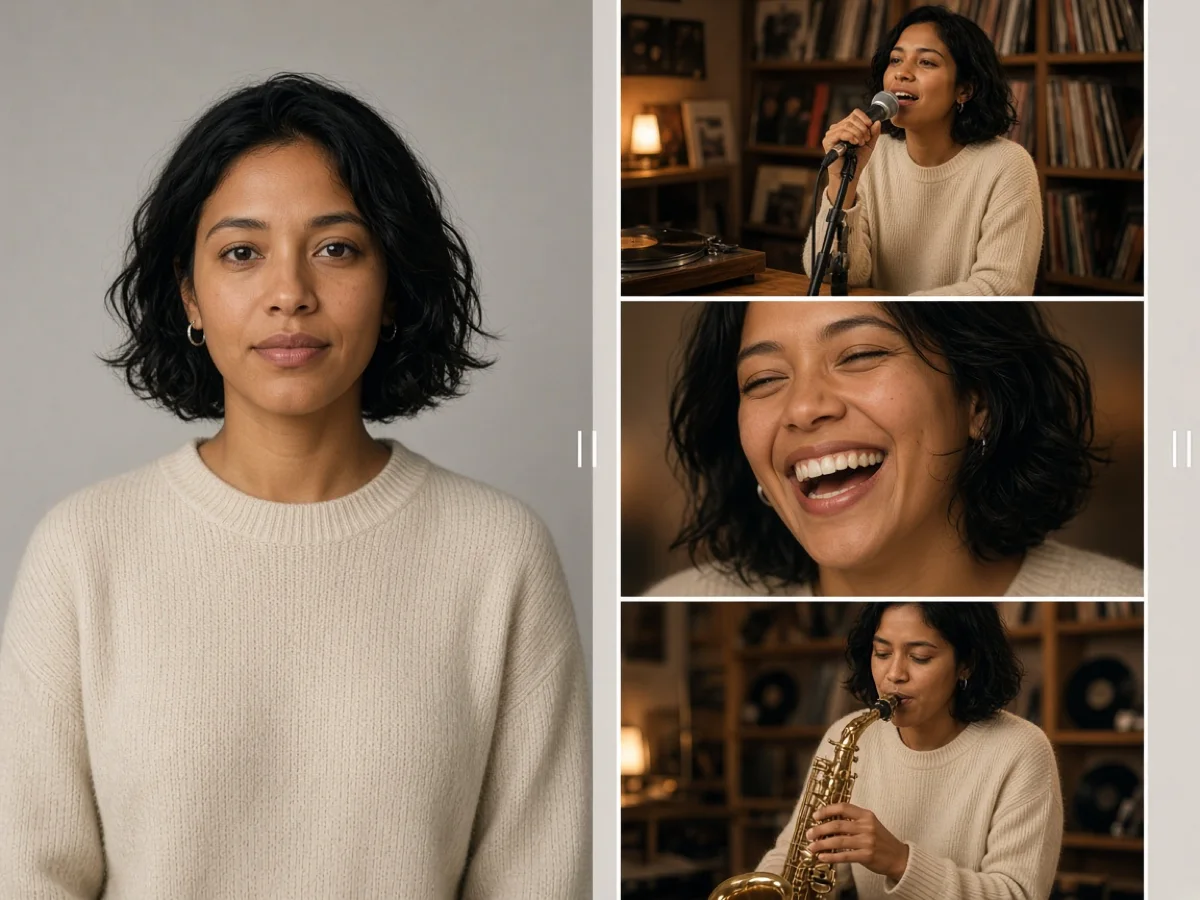
Illustration made for this article. It shows the job a one-photo music trend is doing: one sharp portrait goes in, and the same person comes back inside a performance the photo never contained. The person is fictional. This is not a screenshot of poseloop.app and not a frame from a render we bought.
The Nine Trends, and How to Choose Before You Spend
The trends index is the page that earns its keep. Each card says who can star, how many photos, how long the clip runs, how the sound is handled, and the credit price it starts from. These are the rows we copied on November 19. Where we also opened the template page, the template page is the number we trust, and the table says so.
| Trend | Who can star | Photos | Length | Sound, as the site prints it | Starts from |
|---|---|---|---|---|---|
| Tiny Desk AI | People | 1–5 | 14s | Trend sound. The comparison table says credits are refunded if it cannot be added. The template page prices 480p at 140 and 720p at 310. | 140 credits |
| On The Radar AI | People or pets | 2 | 14s | Trend sound, refunded if it cannot be added | 140 credits |
| Chat GTT AI | People or pets | 1 | 25s | Trend sound, refunded if it cannot be added. The sitemap blurb describes a cashier sketch with the original dialogue. | 250 credits |
| Popstar AI | People | 1 | 5–12s | Trend sound, added when it can be | 50 credits |
| Bulin 47 AI | People | 1 | 5–15s | Trend sound, added when it can be | 50 credits |
| Burning Bridges AI | People | 1 | 5–15s | Trend sound, added when it can be | 50 credits |
| Tesla Roadster AI | Cars | 1 | 12s | Sound effects from the video model | 120 credits |
| Make My Car Fly AI | You and your car | 2 | 10s | Its own sound effects, on the template page | 100 credits |
| Flying Roadster AI | You, your car, or a partner | 1 or 2 | 10s | Its own sound effects, on the template page. Seven scenes. | 100 credits |
Two things in that table are easy to miss, and both of them are about money.
The first is that "from" is a floor, not a quote. Tiny Desk is the clearest example because its own page prints both resolutions: 140 credits at 480p and 310 at 720p, for the same 14 seconds and the same song, Outstanding by The Gap Band. The jump is a bit more than double, for a change of frame size. Popstar, Bulin 47 and Burning Bridges are listed as ranges — 5 to 12 seconds, or 5 to 15 — so a longer cut on those pages will not stay at 50. The button is the quote. The table is the map that stops you opening a 250-credit page when you meant to spend 50.
The second is the sound column, which is three different policies wearing similar clothes. On Tiny Desk, On The Radar and Chat GTT, the comparison table says the trend sound is refunded if it cannot be added. On Popstar, Bulin 47 and Burning Bridges, the same table says the sound is added when it can be, which is a softer sentence: the clip may arrive without the track and still be a finished, charged render. On the car trends, the sound is effects from the video model — engine, boosters — rather than a recording people already know. If the joke of your post is the song, stay on a row whose sound policy you have actually read. If the joke is the car leaving the ground, the effects track is the one the page is selling.
The cast column is the other filter, and it is stricter than the sound column. A pet can star in On The Radar and in Chat GTT. A pet cannot star in Tiny Desk. A car is the subject of Tesla Roadster, Make My Car Fly and Flying Roadster. A portrait of you will not become a ramp flip. Choosing by the photo you have, before you choose by the trend you wish you were in, is the whole selection method.
The Photo Audit, by the Kind of Subject
The homepage FAQ's photo advice is short: a sharp, front-facing picture, one person or one pet, face clearly visible, and a separate file when the trend wants two people or a person and a car. The template pages add the exceptions. Read this as an audit of the file, not as advice about how to look.
One person, one file. Tiny Desk, Popstar, Bulin 47 and Burning Bridges want this. Front-facing, whole head, even light, no sunglasses, no hair across the eyes. Tiny Desk adds three practical lines: one person per photo, because a group shot makes the casting ambiguous; your most expressive friend is the right file for the laugh close-up; plain tops survive better than logos or team shirts, which the clip leaves out. There is an optional outfit field. Leave it empty to keep the clothes in the photo, or describe one outfit for the whole band. Do not upload the pose. The template supplies the mic, the laugh and the sax.
Two or more people. On The Radar wants exactly two files, people or pets, for the green-booth duet. Tiny Desk wants up to five, one face each. If you upload fewer than five, the page says the empty parts go to someone already added, preferring a face that is not already in that shot. That is a feature with a visible cost: one friend may appear twice. If that double would bother the group, either collect the missing photo or pick a one-person trend. Flying Roadster's plane-window scene asks for two different people. A duplicated face there breaks the joke, because the joke is that someone else sees you.
A pet. Chat GTT and On The Radar are the two pet rows. The homepage's pet section asks for a clear photo of the whole animal. A crop that is only eyes, or a shot where the dog is half behind a sofa, gives the cast step the same problem a cropped forehead gives a person: the scene needs a head the model can place, and it will invent the rest. Pets drift more than people do, because the training pressure to produce a generic "dog face" is strong. Use the sharpest recent photo, and watch the muzzle and the ear shape on the way back, not just whether a dog is present.
A car. Tesla Roadster wants one photo of the car. Make My Car Fly wants two: you, and the car. Flying Roadster wants one or two, and each scene names which. The Make My Car Fly page is specific about the car file: photograph the whole vehicle, the rear helps most because the camera stays behind it, and badges and plates come out blank so no logo shows. Any vehicle, it says — car, van, truck or bike. A photo of a badge, a dashboard, or the car cut off at the doors is the car equivalent of a face-only selfie. The model cannot lift a vehicle it cannot see the outline of.
Permission is a separate checkbox from taste. Tiny Desk asks you to confirm you have permission from everyone in the photos. Make My Car Fly asks you to confirm the photos are you and your car, or that you have permission to use both. Those boxes are about the people and the property in the file. They are not a clearance to imply that a record label, a car company, or the original poster of the trend made your clip. If you would not send the finished file to the person in it before you post, you do not have the permission the checkbox is describing.
| What you upload | What the trend is free to invent | What has to stay recognisable |
|---|---|---|
| One front-facing face | The room, the cuts, the clothes if you asked for an outfit, the hands on a prop | Eyes, hairline, the person a friend would name |
| Two portraits | Who stands where, and a second appearance if you under-cast a five-person format | Each face attached to the right friend |
| A pet | The body in the costume of the scene, the counter, the booth | Muzzle, ears, markings |
| The whole car, rear included | The street, the ramp, the boosters, a blank plate | Body shape, colour, the glass and the lamps |
| A group photo in one file | Which face is the lead | Almost nothing. Split it into one face per file first |
How to Make the Clip, on a Trend Page
Everything is in the browser. There is no app to install, and on a trend page there is no open prompt for the scene, because the scene is the page. The homepage's four steps are the short version: pick a trend, add the photos, generate at the price on the button, download the vertical MP4 or share it from the phone. The template pages turn that into something you can actually check. Tiny Desk is the worked example, because it is the trend whose controls we could read in full. The same rhythm — cast, photos, resolution, permission, generate, watch — is what the other pages are doing with different numbers.
1. Open the trend whose photo count you can meet today. Tiny Desk AI says one to five photos, fourteen seconds, Outstanding by The Gap Band, last updated November 5, 2026. If you have one sharp portrait and no friends to ask, you can still run it: the empty chairs are filled by faces you already uploaded. If you specifically want five distinct people, stop and collect five files. Starting "to see what happens" spends the same 140 credits as starting ready.
2. Set the headcount before you upload. The page offers just you, two of you, or three of you, and the card above that accepts up to five. Pick the number that matches the files on your camera roll. This is the control that decides whether a friend appears twice.
3. Add one photo per person, then decide the outfit in one sentence or not at all. One face, clearly lit, whole head. Leave the outfit field empty to keep real clothes. If you do describe an outfit, describe one outfit for the band, not a different costume per person. Logos on shirts are a known loss: the page says the clip leaves them out. A shirt you need to remain readable is the wrong shirt for this template.
4. Choose 480p or 720p as a budget decision, not a quality feeling. Both are 9:16 and both are fourteen seconds. On the day we read the page, 480p was 140 credits and 720p was 310. The song, the cuts and the cast do not change between them. A soft source photo will be soft at both sizes, because the missing detail was never in the file. Spend 140 to learn whether the cast holds. Spend 310 when a 480p take is already a clip you would post, and you want the larger frame.
5. Tick the permission box only when it is true, then press the button that shows the price. The control reads "Sign in to make it" until you have an account. New accounts start with 15 credits, good for 90 days. Fifteen does not cover a 140-credit render, so a first trend is a paid render even though the account came with a grant. The grant is large enough for a short test on the open generator, which is a different decision and the subject of a later section. Nothing is charged until you press the button. If the render fails, the page says the credits come back with nothing to file.
6. Leave the tab. The Tiny Desk page says the job takes a few minutes: it recreates the band shot, the laugh and the sax shot with your faces, copies the performance, and adds the sound. You can leave. The file lands in My creations. Waiting on the progress indicator does not change the result.
7. Watch the whole fourteen seconds before you download with any pride. Play it once with sound, at the size you will post. Check five things in order. Is each face still the friend you uploaded, including in the laugh close-up, where a cut gives the model a fresh chance to drift? Does anyone appear in a chair you did not mean them to fill? Are the hands on the microphone and the saxophone a plausible count of fingers, or a smear into the metal? Did the clothes survive, or did a logo you needed vanish and a neckline change? Is the recording actually under the picture for the full length, or does the clip go thin where the table said a missing track would be refunded?
Then label it. The file shows your friends in a room they did not stand in, performing a song they did not sing. A caption that treats it as a joke keeps the joke. A caption that presents it as a filmed session is a different claim. Turn on the platform's label for AI-generated video. The template did not do that part for you.
Cars Are a Second Product Wearing the Same Button
The music trends recast a face into a room. The car trends recast a vehicle into a stunt, and the photo rules change with the subject. Make My Car Fly's own page, read the same day, says two photos become a ten-second vertical clip with its own sound effects, from 100 credits. You walk to the car at golden hour, glance back, get in, and four boosters lift it. The steps the page prints are: add you and the car, pick Standard or Sharper, then wait while it draws a reference sheet of the car, stages the opening frame, and renders the take-off. "A few minutes" is the timing it gives. Standard and Sharper are both ten seconds and both vertical. Sharper is a higher-detail video model. The button, again, is where the two prices will differ, and we are not going to invent the gap.
Flying Roadster is the variant with a menu. One or two photos, ten seconds, from 100 credits, seven scenes, effects rather than a song. The scenes the page lists are a lift over a traffic jam, a drop into the last parking space, a car outside a plane window, a drive along a tunnel wall, and a take-off over Paris. Each scene names its photos. The plane scene wants two different people. A line on that page is worth pinning above the upload: nobody from a car photo appears inside the car. The car file is a car. The person file is a person. Mixing them to save a shot is how you get a stranger in the driver's seat.
Tesla Roadster, on the comparison table, is the single-photo version: one car, twelve seconds, sound effects from the video model, from 120 credits, the ramp and the flip. We did not open its template page beyond the index row, so 120 and twelve seconds are index figures, not a button we hovered.
The practical test before you pay for any of the three is the outline. If you cannot trace the roof, the glass and both lamps in the still, the reference sheet the car pages describe has nothing honest to copy, and the booster shot will be a different car with your colour on it.
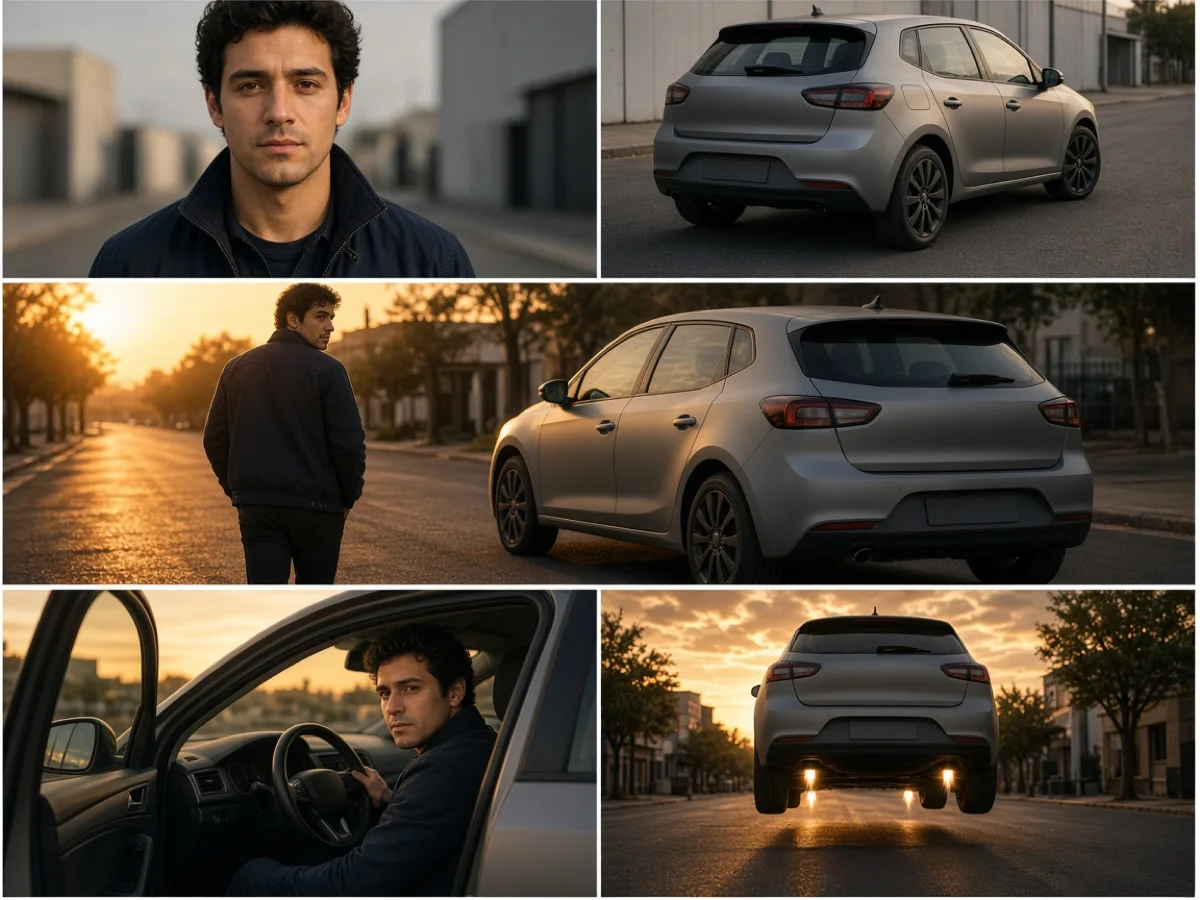
Illustration made for this article. It follows the beat the Make My Car Fly page describes: a photo of a person, a photo of the whole car, then the walk-up, the seat, and the lift. The person is fictional, the car has no badge, and the plate is blank on purpose. This is not a screenshot and not a render we bought.
What the Credits Actually Buy
The pricing page sells three one-time packs, and it also offers monthly and yearly plans. We are quoting the packs, because those prices were on the page without opening a second tab. The plan cards are a billing toggle we are not going to invent numbers for. The FAQ on that page says a pack suits a few trends, a plan suits regular posting because it refills the balance every month at a lower price per credit, and yearly costs less again. Pack credits never expire. Plan credits belong to the billing period and expire when it ends. When a render draws credits, it spends the ones that expire first.
| Pack | Price, one time | Credits | What that covers at the floors we read |
|---|---|---|---|
| Starter | $9.99 | 200, never expire | One Tiny Desk at 480p (140) with 60 left. Not a 720p Tiny Desk (310). Not Chat GTT (250). Four clips if a 50-credit floor still applies. |
| Plus | $24.99 | 600, never expire | A 720p Tiny Desk (310) plus a 480p one (140), with 150 left. Or Chat GTT (250) plus a 140-credit trend, with room for a car clip at 100. |
| Max | $59.99 | 1600, never expire | The same menu, several weeks of it. Ten 140-credit clips is 1,400, with 200 left. |
The per-credit reading of those printed prices is $0.04995 on Starter, $0.04165 on Plus, and $0.03749 on Max. A 140-credit Tiny Desk is about $7.00 of a Starter pack and about $5.25 of a Max pack. That arithmetic is a way to compare packs. It is not a second price list, and it goes stale the moment a pack price moves.
The free grant needs the same honesty. Fifteen credits for 90 days will not buy any trend in the table above. The cheapest floors we saw were 50. Fifteen will buy a short test on the open generator if you pick a model whose floor is under 15. On the generator page, Seedance 2.0 Mini starts at 10 credits, for 4 to 15 seconds at up to 720p. The generate control on the page we loaded read "from 28," which is a selected setup, so a default press may ask for more than the cheapest card. Read the button.
One line on the pricing FAQ is easy to spread further than it goes. Images made with the free credits carry a small watermark, and paid credits download images clean. The sentence says images. We are not going to extend it to video, because the page did not.
A failed render is a different bucket from a refund. The pricing page, the trend pages and the refund policy all say the same thing about failure: the credits reserved for a render that fails return to the balance on their own, and you do not file a ticket. Cash back is the other bucket. The refund policy, dated January 7, 2026, says a payment can be returned when no more than seven days have passed since the first purchase or the opening charge of a subscription, and the paid balance is substantially unspent. Credits that came back after a failure do not count as usage. Finished clips do. Standalone packs normally fall outside that policy except where the law requires otherwise. Being unhappy with how a generated clip looks is not, on its own, a defect. The policy says the frames are produced by a model, so variation with the effect and the photo is a property of the product. Approved payments go back the way they came, commonly five to ten business days once the site has released them. Write to support@poseloop.app with the account email and the receipt.
The pricing page is the version of this table that can move. Use it on the day. Use this article to know which number to look at: the button on the trend, then the pack that covers two attempts rather than one.
Sound, Labels, and the Post You Still Have to Make
A trend clip is only half finished when the MP4 arrives, because the thing that makes it legible in a feed is usually the audio, and the audio is the part you do not fully control.
On a music trend, the site is laying a known recording under a picture of you. Tiny Desk names the recording: Outstanding by The Gap Band. Popstar, Bulin 47 and Burning Bridges describe performances people already recognise, and their comparison-table policy is the softer one — added when it can be. If the file comes back silent, you do not have the trend yet. You have a mute restaging. On the three rows that say a missing track is refunded, silence is a billing event as well as a creative one, and the credit return is the remedy the table prints. On the rows that only say the sound is added when it can be, silence may still be a charged result. That difference is why the sound column is worth reading before the cast column feels exciting.
On a car trend, the audio is effects. The joke survives a missing song, because there was no song. It does not survive a missing car. Spend your attention on the vehicle, not on the rumble.
Posting is manual. Download the MP4, or use the share path from the phone. My creations holds the file, private by default, and a public link is something you turn on and can turn off. PoseLoop does not log into TikTok for you. The vertical frame means you should not need to crop. The sound, if it arrived, means you may not need to add a track. You still write the caption, you still meet the platform's label for synthetic media, and you still decide whether a business account is allowed to use that recording. A generator that includes a commercial song has not, by including it, settled your ad account. Read the terms on the day you post. They bind you. This paragraph does not.
There is a cheaper version of every one of these trends, and it is filming. A desk, a phone, and the people already in the room will always beat a recast on the only question that sometimes matters: did these hands actually play. The generator is the tool for the case where the room, the sax, the ramp or the five friends cannot be in the same place this week, and you have a photo that can stand in. If you can film, film. The site is selling the case where you cannot.
When the Trend Is the Wrong Tool
PoseLoop's open AI video generator is the other product on the domain, and it is the one that matches the strict meaning of image to video. The page describes a prompt or a photo, then a model, a length, a shape and a resolution. Finished clips land in My Videos. Private is the default. A public video is a share link you can revoke.
The model cards we read, and the floors printed on them:
| Model | Length | Up to | From |
|---|---|---|---|
| Seedance 2.0 Mini | 4–15s | 720p | 10 credits |
| Veo 3.1 Fast | 8s | 4K | 19 credits |
| MiniMax H3 | 4–15s | 2K | 21 credits |
| Kling 2.6 | 5 or 10s | 1080p | 35 credits, and the page says sound doubles that starting price |
| Wan 2.6 | 5, 10 or 15s | 1080p | 44 credits |
| Seedance 2.5 | 4–30s | 1080p | 71 credits |
The page says those pictures show the kind of shot, not that model's output, and that a longer or sharper clip costs more. Some cards can take a last frame as well as a first. Shapes include 9:16 on every row we saw, which is the one that matters if the destination is still TikTok.
Use this generator when you want your own room to survive. A product on a table, a person in a real kitchen, a pet doing one action you describe: that is frame-locked image to video, and the prompt should describe motion and camera, not re-describe the photo. Use a trend page when you want a format the feed already understands, and you are willing to leave the room behind. Using the trend page to "keep my background" fights the product. Using the open generator to "make the Tiny Desk" by describing a desk in words throws away the cuts, the laugh and the recording the template exists to keep.
The 15-credit grant belongs here, on a 10-credit Seedance 2.0 Mini test, if the button agrees. It is a way to learn whether a photo animates at all before you buy a pack for a 140-credit recast. It is not a free trend.
What to Do When the Clip Comes Back Wrong
Four failures show up often enough to plan for, and each one points at a different lever. A new render is a new charge. It is not an edit of the file you already have.
The face drifted on a cut. Common when the source is small, soft, filtered, or turned away. The laugh close-up on a music trend is where you will see it, because the face is suddenly large. Replace the photo with a sharper front-facing file before you buy a higher resolution. 720p enlarges a guess. It does not supply the missing photograph.
The wrong friend is in the chair. You under-cast a multi-person template, and the page did what it said it would do with the empty parts. Add the missing photo, or switch to a one-person trend. Re-running the same files will spend credits to reproduce the double.
The hands or the prop melted. The prop was never in your upload. If the face is right and the hand on the sax or the cup is wrong, a second attempt is a gamble on a different sample, not a correction you can target. For a car, the equivalent is a vehicle that changed body style between the street and the sky. Go back to the full-car photo before you pay for Sharper.
The sound is missing. Check which policy you bought. A refunded-if-missing row should return the credits without a ticket if the track could not be added. An "added when it can be" row may have delivered a silent file as the product. A car clip with no engine note is a different complaint from a music clip with no song, and only the second one breaks the trend.
There is a fifth outcome that is working as designed and still feels like a failure: plates and badges blanked, team logos dropped, an outfit simplified. The car page and the Tiny Desk page both say this will happen. If the brand on the shirt or the badge on the boot is the point of the post, this tool will sand it off, and a second credit spend will sand it off again.
Who This Is For
It fits a person who has one sharp photo, has watched a format for a week, and would rather pay for a 50- or 140-credit attempt than assemble the room. It fits a group that can each send one portrait and does not mind that the desk, the booth or the mansion is invented. It fits a pet account that needs a new sketch and has a clear photo of the whole animal. It fits a car page that can photograph the whole vehicle from behind and wants the stunt more than it wants the badge.
It fits badly if the background of your photo is the point, if you need every logo to remain readable, if the people in the file have not agreed, or if you need the clip to be evidence of something that happened. It also fits badly as a free try. The grant is real and it is small, and the trend floors sit above it. Filming remains the free route, and it is the route where the hands are yours.
Frequently Asked Questions
Is image to video AI the same thing as photo to video AI?
On PoseLoop's own FAQ, yes. Both phrases mean a still becomes a short clip. The decision that still matters is whether the clip keeps your scene or replaces it with the trend's scene. The homepage is selling the second. The open generator can do the first, if you upload a photo and describe motion.
Do I write a prompt?
On a trend page, no. You pick the format, the photos, and on some pages a resolution, a headcount or an outfit line. The scene, the cuts and the length are the template. On the AI video generator, yes. That page is a prompt, a model, a length, a shape and a resolution.
Can I make a trend with the 15 free credits?
Not at the floors printed on November 19. The live trends started at 50, 100, 120, 140 or 250 credits. The grant is 15 credits for 90 days. It can cover a short Seedance 2.0 Mini test on the open generator, whose card starts at 10, if the button still says a number you have.
Which trend is the cheap one?
Popstar, Bulin 47 and Burning Bridges were the 50-credit floors, with lengths that run from 5 seconds up to 12 or 15, so the floor is the short end. Tiny Desk and On The Radar started at 140. Chat GTT, at 25 seconds, started at 250. The car pages we opened started at 100. Confirm on the button, because "from" moves when you change resolution or length.
Will my clip go viral?
The site can put you in a format that is currently being posted. It cannot put the views on the file. A clean cast, the sound the trend actually uses, a vertical frame and a caption that tells the truth are the parts you control. The distribution is the platform's.
Are the photos private?
The homepage says photos are used to make the clip, videos stay in My creations, and they are private unless you create a share link. Examples on the trend pages are made from fictional people and pets, and the pages say so. That is a statement about their examples, not a review of their storage. The privacy policy is the document that binds the account.
What if I hate the result but the render succeeded?
The refund policy treats that as variation, not as a failed job. Credits come back automatically when a render fails. A finished clip you dislike is usage. Look at the photo and the trend choice before you buy the next one. Write to support@poseloop.app if a charge or a missing credit return does not match what the button and the policy describe.
Can I post it as an ad?
You can download an MP4 and put it where your rights allow. You need the right to the photos, and you need the right to the audio for the place you are posting it. A trend page that includes a commercial recording has not written your licence for you. Business accounts and paid placements are the cases where this usually matters. Read the terms, then read the platform's music rules.
The Short Version
Image to video, photo to video, a viral generator, a trend generator, a TikTok generator: on this site those are one upload with the scene decided in advance. You bring a face, a pet or a car the template can see. It brings the room, the cuts, the length and, on some rows, the recording. The credit button is the price. The comparison table is how you avoid opening a 250-credit page when a 50-credit page was the joke you meant. Fifteen free credits are a small test on the open generator, not a trend.
So pick the row your photos can support. Buy a pack that covers a second attempt if the first is how you learn the cast. Watch the whole clip for the face on the close-up, the hands on the prop, and the sound the table promised. Label the post. And if the people and the room are available this week, film them. The generator is for the week they are not.
If you want the numbers on the day you pay, start at PoseLoop, open the trend, and read the button. The button is the quote. This page is the map we drew on November 19.